1. はじめに
このセクションは規範的ではない。
CSS Multicol 1 § 4 列 ギャップと罫線では、 作者がマルチカラムコンテナー内の列間の間隔を制御し、 それらの空間に線などの可視の区切りを描画できるようにするプロパティが定義された。 これらの可視の区切りをギャップ装飾と呼ぶ。
この仕様は、以前に定義されたプロパティを拡張する。 行方向に対応する同等のプロパティを追加し、 プロパティの完全な集合を他のコンテナー型にも適用し、 ギャップ装飾をどこに、どのように描画するかについて追加の制御を与える。
1.1. 値の定義
この仕様は、[CSS2]のCSSプロパティ 定義規約に従い、 [CSS-VALUES-3]の値定義構文を使用する。 この仕様で定義されない値型は、CSS Values & Units [CSS-VALUES-3]で定義される。 他のCSSモジュールとの組み合わせにより、これらの値型の定義が拡張される場合がある。
各プロパティの定義に列挙されるプロパティ固有の値に加えて、 この仕様で定義されるすべてのプロパティは、 プロパティ値としてCSS全域キーワードも受け付ける。 読みやすさのため、それらは明示的には繰り返していない。
2. ボックス間のギャップ
marginおよびpaddingは個々のボックスの周囲の視覚的な間隔を指定するために使用できるが、 与えられたレイアウトコンテキスト内で隣接するボックスの 間の間隔を大域的に指定する方が便利な場合がある。 特に、その間隔が兄弟ボックス間と、 最初/最後のボックスとコンテナー端との間で異なる場合である。
gap プロパティ、 およびそのサブプロパティであるrow-gapとcolumn-gapは、 この機能を マルチカラム、 フレックス、 およびグリッドレイアウトに提供する。
ギャップとは、列ギャップまたは行ギャップのいずれかであり、 その定義はコンテナーの型により異なる:
- マルチカラムコンテナー
-
列ギャップは、隣接する列ボックス間のガターである。
[CSS-MULTICOL-1]を参照。
行ギャップは、column-heightにより確立される列ボックスの行間のガターである。 [CSS-MULTICOL-2]を参照。
- フレックス コンテナー
-
主軸に適用される場合
(たとえば、rowのフレックス
コンテナーにおける列ギャップ)、
項目間のガターを指す
(あたかも単一行内の隣接するフレックス項目間に、
追加の固定サイズのマージンが挿入されたかのように)。
交差軸に適用される場合 (たとえば、rowのフレックス コンテナーにおける行ギャップ)、 隣接するフレックス行間のガターを指す。
- グリッド コンテナー
- 行ギャップおよび列ギャップは、 グリッドコンテナーのコンテキストにおいて、 それぞれグリッド 行およびグリッド列間のガターを指す。 正確な詳細については、CSS Grid Layout 1 § 10.1 ガター: row-gap、column-gap、およびgapプロパティを参照。
ガターは項目間の最小間隔として作用する: 追加の間隔はjustify-content/align-contentによって追加される場合がある。 そのような追加空間は、対応するギャップのサイズを増加させる。
いずれの場合も、ギャップは、 断片化分断と一致する場合には消滅する。[CSS-BREAK-3]
注: 表ボックスは、セル間の分離を指定するためにgapプロパティを使用しない。 代わりに、border-spacingプロパティを使用する。 これはやや異なる機能を持つ: 継承され、 さらに最外周のセルと表の境界との間の追加間隔も指定する (space-betweenというよりもspace-evenlyに近い)。
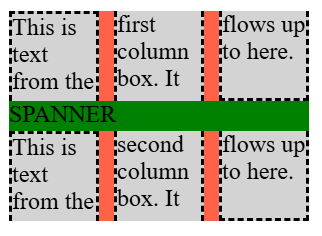
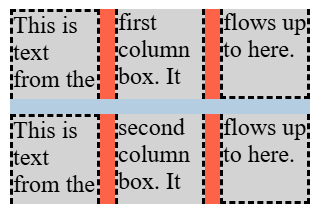
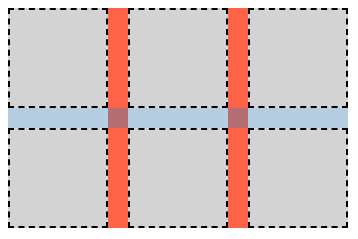
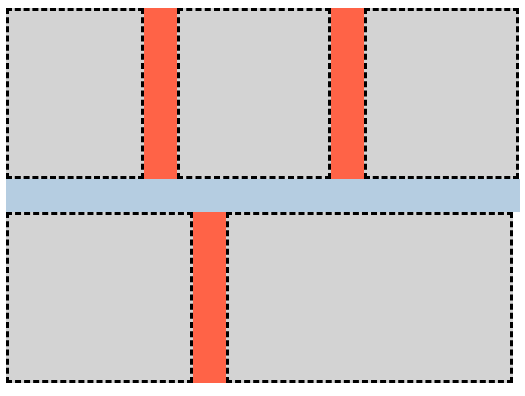
2.1. 行および列のガター: row-gapおよびcolumn-gapプロパティ
| 名前: | row-gap, column-gap |
|---|---|
| 値: | normal | <length-percentage [0,∞]> | <line-width> |
| 初期値: | normal |
| 適用対象: | マルチカラムコンテナー、フレックス コンテナー、グリッド コンテナー |
| 継承: | no |
| パーセンテージ: | § 2.3 gapプロパティにおけるパーセンテージを参照 |
| 算出値: | 指定されたキーワード、そうでなければ算出された<length-percentage>値 |
| 正準順序: | 文法に従う |
| アニメーション型: | 算出値の型による |
これらのプロパティは、コンテナー内の項目間に固定長のガターを指定し、 それらの間に空間を追加する。これはコンテンツ分配プロパティの space-betweenキーワードに似た方法であるが、 残り空間の割合ではなく固定サイズである。 column-gapプロパティは“列”間の間隔を指定し、 インライン軸においてコンテナー内のボックスを分離する。 これはインライン軸のマージンに似ている。 一方、row-gapは“行”間の間隔を示し、 コンテナーのブロック軸においてボックスを分離する。
値は次の意味を持つ:
- <length-percentage [0,∞]>
- <line-width>
-
適用されるレイアウトモードにより定義される行ギャップまたは列ギャップを指定する。
負の値は無効である。 パーセンテージについては、 § 2.3 gapプロパティにおけるパーセンテージを参照。
- normal
-
normal値は、 マルチカラムコンテナーでは使用値1emを表し、 それ以外のすべてのコンテキストでは使用値0pxを表す。
2.2. gap一括指定: gapプロパティ
| 名前: | gap |
|---|---|
| 値: | <'row-gap'> <'column-gap'>? |
| 初期値: | 各個別プロパティを参照 |
| 適用対象: | マルチカラムコンテナー、フレックス コンテナー、グリッド コンテナー |
| 継承: | no |
| パーセンテージ: | コンテンツ領域の対応する寸法を基準とする |
| 算出値: | 各個別プロパティを参照 |
| 正準順序: | 文法に従う |
| アニメーション型: | 算出値の型による |
このプロパティは、row-gapおよびcolumn-gapを1つの宣言で設定する一括指定である。 <'column-gap'>が省略された場合、 それは<'row-gap'>と同じ値に設定される。
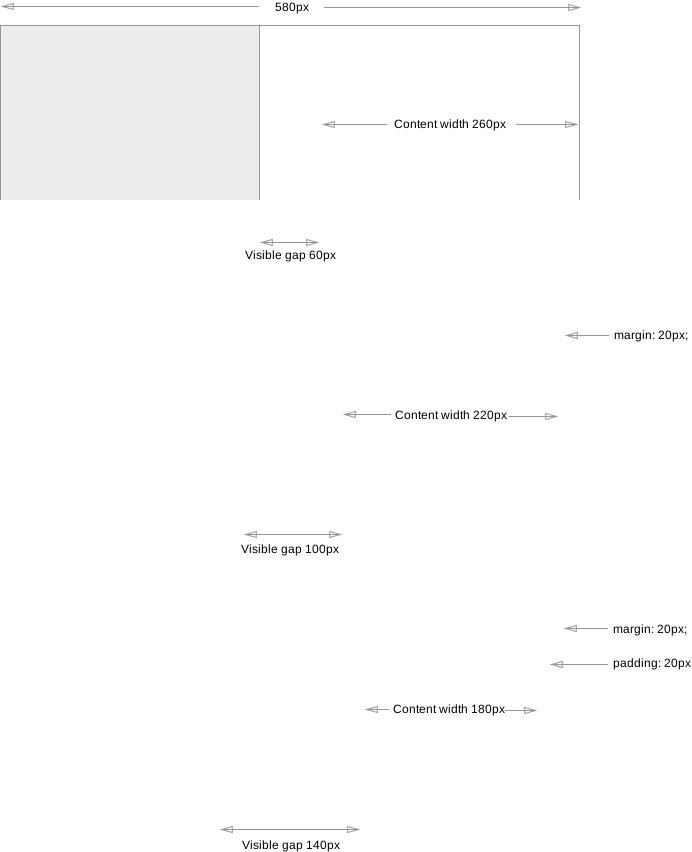
注: gapプロパティは、 ボックス間に作成される可視の“gutter”または“alley”の1つの構成要素にすぎない。 マージン、パディング、または分配配置の使用により、 ボックス間の可視の分離は gapで指定される値を超えて増加する場合がある。
2.3. gapプロパティにおけるパーセンテージ
一般に、 gapプロパティによって導入されるギャップは、 ギャップのサイズを持つ空の項目/トラックなどのように作用することが意図されている。 言い換えると、 作者は、追加の空の項目/トラックなどを コンテナーに挿入するだけで、gapの効果を再現できるべきである。
gapは、 常に要素のコンテンツボックスの対応するサイズを基準に パーセンテージを解決する。 このサイズが確定している場合、 挙動は明確に定義され、 レイアウトモード間で一貫している。 しかし、異なるレイアウトモードは、項目/トラックなどの循環パーセンテージサイズを異なる方法で扱うため、 gapも同様である:
- グリッドレイアウトの場合
-
最小サイズプロパティおよびマージン/パディングの場合と同様に [CSS-SIZING-3]、 循環パーセンテージサイズは、内在サイズ寄与の決定ではゼロに対して解決されるが、 ボックスの内容をレイアウトするときは ボックスのコンテンツボックスに対して解決される。
- フレックスレイアウトの場合
-
循環パーセンテージサイズは、すべての場合でゼロに対して解決される。
2.4. レガシーなギャッププロパティ: grid-row-gap、grid-column-gap、およびgrid-gap プロパティ
Grid Layoutモジュールは、既存のrow-gap/column-gap という命名にすべてのそのようなプロパティが統一される前に、 独自のガタープロパティの集合を持つものとして書かれていた。 レガシーコンテンツとの互換性のため、 これらのgrid接頭辞付きの名前は次のようにサポートしなければならない:
-
grid-row-gapを、row-gap プロパティのレガシー名エイリアスとして
-
grid-column-gapを、column-gapプロパティのレガシー名エイリアスとして
-
grid-gapを、gapプロパティのレガシー名エイリアスとして
3. ギャップ装飾
ギャップは、隣接するボックス間に描画される可視の区切り(線など)であるギャップ装飾を含むことができる。
ギャップ装飾は空間を占有しない。 すなわち、ギャップ装飾の存在または幅は、 他のものの配置を変更しない。 ギャップ装飾がそのギャップより広い場合、 隣接するボックスはその装飾と重なり、 場合によっては装飾がコンテナーのボックスの外側へ延びることがある。
ギャップ装飾は、 コンテナーの境界のすぐ上に描画される。 スクロール可能なコンテナーでは、 コンテナーの境界および背景はスクロールされない一方、 装飾はコンテナー内の項目とともにスクロールする必要があることに注意。
ギャップ装飾は、 プロパティが適用されるコンテナーによって定められる"column"および"row"の定義に従う。 これらの用語の意味を決定する際、コンテナー型が書字 モードを考慮することに依存する。 例については次を参照: CSS Multicol 2 § 3 マルチカラムモデル、 CSS Flexbox 1 § 5.1 フレックス フロー方向: flex-directionプロパティ、 および CSS Grid Layout 1 § 3 グリッドレイアウト の概念と用語。
この仕様で名前が"column"で始まるプロパティは列ギャップに適用され、 名前が"row"で始まるプロパティは行ギャップに適用される。
3.1. ジオメトリ
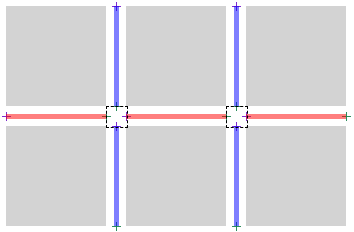
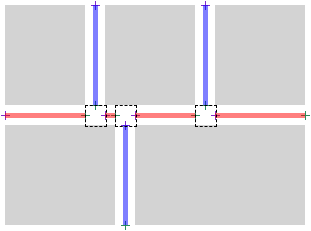
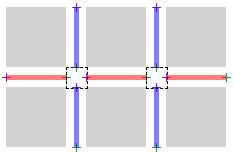
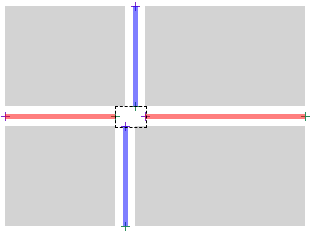
ギャップ装飾は、 ギャップ内に、1つ以上のギャップ装飾 セグメントとして描画される。
3.1.1. セグメント端点
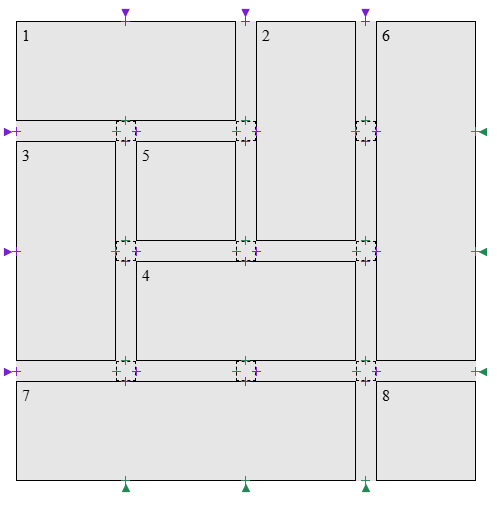
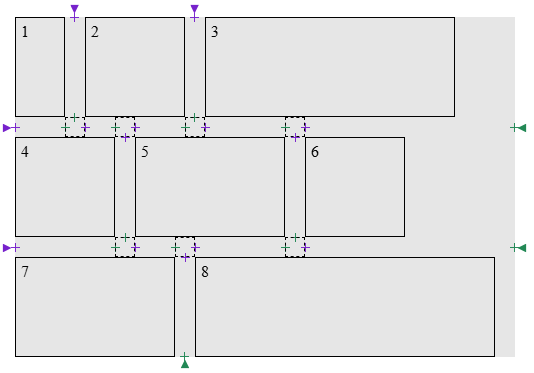
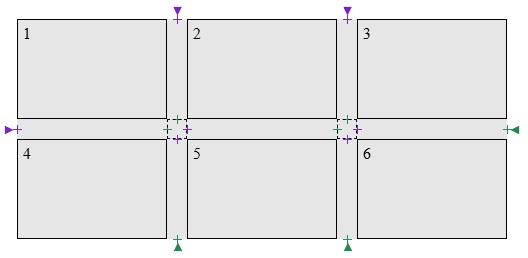
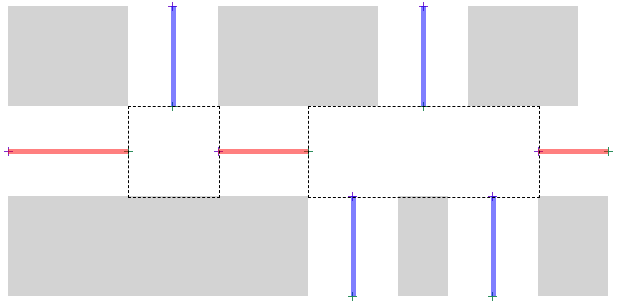
セグメント端点とは、 ギャップの中心線上にある点で、 ギャップ装飾 セグメントが開始または終了できる点である。 端点の型は2つある:
-
ギャップの境界:
Gの2つの境界に端点を作成する:
- Gの開始辺の中心点に、開始セグメント 端点を作成する。
- Gの終了辺の中心点に、終了セグメント端点を作成する。
ギャップがコンテンツ境界まで走る場合、これらの端点は 対応するコンテンツ辺と一致する。
-
ギャップ内:
ギャップ接合部とは、 Gの領域であり、 1つ以上のギャップが Gに接する、または重なる領域である。 各ギャップ接合部について、 2つのセグメント 端点を作成する:
- ギャップ 接合部へ入る: Gの少なくとも一方の側に交差ギャップが現れる点に、 終了セグメント端点を作成する。
- ギャップ 接合部から出る: Gのどちら側にも交差ギャップが存在しなくなる点に、 開始セグメント端点を作成する。
この順序(終了セグメント端点、開始セグメント端点)は、 ギャップ 接合部が、1つのトラック/項目/列の終端および別のものの始端に対応することを反映している。
.grid-with-spans {
  display: grid;
  grid-template: repeat(4, 100px) / repeat(4, 100px);
  gap: 20px;
  background: rgb(255 255 128);
}
.grid > * {
  border: 1px dashed black;
}
.flex {
  display: flex;
  flex-wrap: wrap;
  gap: 20px;
  width: 500px;
  background: rgb(255 255 128);
}
.flex > * {
  border: 1px dashed black;
}
.multi-column {
  column-count: 3;
  column-width: 100px;
  column-height: 50px;
  column-wrap: wrap;
  gap: 20px;
  background: rgb(255 255 128);
}

.multi-column > * {
  height: 100px;
  border: 1px dashed black;
}
3.1.2. ギャップ装飾セグメント
定義
ギャップ装飾 セグメントは、開始セグメント端点と終了セグメント端点を組にすることにより形成される。 各ギャップは、ギャップ装飾 セグメントの集合を形成する。
このセクションでは、ギャップ装飾セグメントsを
s = [s.start, s.end]として表す。
ここで、s.startはそのセグメントの開始セグメント端点であり、
s.endはそのセグメントの終了セグメント端点である。
UNION(s1, s2)は、[s1.start, s2.end]に等しいものとする。
ギャップ装飾 セグメントは、 その端点間にあるすべてのギャップ接合部について、 その接合部に寄与するすべての垂直方向のギャップをまたいで 反対側にある項目が存在する場合、スパンする項目に挟まれているという。
与えられたギャップのコンテキストにおいて、 セグメント端点の対 aおよびbは、 aからbまでの線分が、ギャップと同じ幅を持ち、 コンテナー内の子項目と交差する場合、 非連続とみなされる。
アルゴリズム
- Sを空のリストとする。
-
endpointsを、Gについてセグメント端点を作成した結果とし、
Gの中心線に沿った開始から終了までの位置で順序付ける。
注: このリストは、 開始セグメント端点と終了セグメント端点が厳密に交互に並ぶ 偶数個の要素を含み、 開始セグメント端点で始まることが保証される。
- endpointsが空であれば、Sを返す。
- breakを、ギャップに適用される方であるcolumn-rule-break またはrow-rule-breakの使用値とする。
-
breakがnoneである場合:
- firstをendpoints内の最初の項目とする。
- lastをendpoints内の最後の項目とする。
- ギャップ装飾セグメントsegment = [first, last]を作成する。
- segmentにオフセットを適用し、それを Sに追加する。
- Sを返す。
- 空チェック: endpointsが空であれば、Sを返す。
- endpoints内の最初の2項目からギャップ装飾セグメントsを作成する。 その両方をリストから取り除く。
- sの端点が非連続である場合、空チェックに戻る。
-
endpointsが空でない間:
- endpoints内の最初の2項目からギャップ装飾セグメントnextを作成し、 その両方をリストに残す。
- candidateをUNION(s, next)とする。
- candidateの端点が非連続である場合、このループを抜ける。
- breakがintersectionであり、 candidateがスパンする項目に挟まれていない場合、このループを抜ける。
- endpointsから最初の2項目を取り除く。
- sをUNION(s, next)に設定する。
- sにオフセットを適用し、それを Sに追加する。
- 空チェックに戻る。
- 適用されるrule-insetプロパティの使用値により、startをオフセットする。
- 適用されるrule-insetプロパティの使用値により、endをオフセットする。
- 調整された[start, end]でsを更新する。
テスト
- flex-gap-decorations-001.html (ライブ テスト) (ソース)
- flex-gap-decorations-006.html (ライブ テスト) (ソース)
- flex-gap-decorations-007.html (ライブ テスト) (ソース)
- flex-gap-decorations-008.html (ライブ テスト) (ソース)
- flex-gap-decorations-015.html (ライブ テスト) (ソース)
- flex-gap-decorations-016.html (ライブ テスト) (ソース)
- flex-gap-decorations-020.html (ライブ テスト) (ソース)
- flex-gap-decorations-021.html (ライブ テスト) (ソース)
- flex-gap-decorations-022.html (ライブ テスト) (ソース)
- flex-gap-decorations-023.html (ライブ テスト) (ソース)
- flex-gap-decorations-024.html (ライブ テスト) (ソース)
- flex-gap-decorations-025.html (ライブ テスト) (ソース)
- flex-gap-decorations-026-crash.html (ライブ テスト) (ソース)
- flex-gap-decorations-027.html (ライブ テスト) (ソース)
- flex-gap-decorations-032.html (ライブ テスト) (ソース)
- flex-gap-decorations-033.html (ライブ テスト) (ソース)
- flex-gap-decorations-039.html (ライブ テスト) (ソース)
- flex-gap-decorations-040.html (ライブ テスト) (ソース)
- flex-gap-decorations-041.html (ライブ テスト) (ソース)
- flex-gap-decorations-042.html (ライブ テスト) (ソース)
- flex-gap-decorations-043.html (ライブ テスト) (ソース)
- flex-gap-decorations-044.html (ライブ テスト) (ソース)
- flex-gap-decorations-045.html (ライブ テスト) (ソース)
- flex-gap-decorations-046.html (ライブ テスト) (ソース)
- flex-gap-decorations-047.html (ライブ テスト) (ソース)
- flex-gap-decorations-048.html (ライブ テスト) (ソース)
- flex-gap-decorations-049.html (ライブ テスト) (ソース)
- flex-gap-decorations-056.html (ライブ テスト) (ソース)
- flex-gap-decorations-057.html (ライブ テスト) (ソース)
- flex-gap-decorations-058.html (ライブ テスト) (ソース)
- flex-gap-decorations-059.html (ライブ テスト) (ソース)
- flex-gap-decorations-060.html (ライブ テスト) (ソース)
- flex-gap-decorations-061.html (ライブ テスト) (ソース)
- flex-gap-decorations-repaint-on-child-resize.html (ライブ テスト) (ソース)
- flex-gap-decorations-repaint-on-container-shift.html (ライブ テスト) (ソース)
- flex-gap-decorations-writing-mode.html (ライブ テスト) (ソース)
- grid-gap-decorations-001.html (ライブ テスト) (ソース)
- grid-gap-decorations-029.html (ライブ テスト) (ソース)
- grid-gap-decorations-030.html (ライブ テスト) (ソース)
- grid-gap-decorations-031.html (ライブ テスト) (ソース)
- grid-gap-decorations-032.html (ライブ テスト) (ソース)
- grid-gap-decorations-033.html (ライブ テスト) (ソース)
- grid-gap-decorations-034.html (ライブ テスト) (ソース)
- grid-gap-decorations-035.html (ライブ テスト) (ソース)
- grid-gap-decorations-036.html (ライブ テスト) (ソース)
- grid-gap-decorations-037.html (ライブ テスト) (ソース)
- grid-gap-decorations-041-crash.html (ライブ テスト) (ソース)
- grid-gap-decorations-042.html (ライブ テスト) (ソース)
- grid-gap-decorations-043-crash.html (ライブ テスト) (ソース)
- grid-gap-decorations-044-crash.html (ライブ テスト) (ソース)
- grid-gap-decorations-045.html (ライブ テスト) (ソース)
- grid-gap-decorations-046.html (ライブ テスト) (ソース)
- grid-gap-decorations-047.html (ライブ テスト) (ソース)
- grid-gap-decorations-066.html (ライブ テスト) (ソース)
- grid-gap-decorations-repaint-on-child-resize.html (ライブ テスト) (ソース)
- grid-gap-decorations-repaint-on-item-position-change.html (ライブ テスト) (ソース)
- grid-gap-decorations-repaint-on-item-span-change.html (ライブ テスト) (ソース)
- grid-gap-decorations-writing-mode.html (ライブ テスト) (ソース)
- subgrid-gap-decorations-001.html (ライブ テスト) (ソース)
- subgrid-gap-decorations-002.html (ライブ テスト) (ソース)
- subgrid-gap-decorations-003.html (ライブ テスト) (ソース)
- subgrid-gap-decorations-009.html (ライブ テスト) (ソース)
- subgrid-gap-decorations-010.html (ライブ テスト) (ソース)
- subgrid-gap-decorations-011.html (ライブ テスト) (ソース)
- subgrid-gap-decorations-012.html (ライブ テスト) (ソース)
- subgrid-gap-decorations-013.html (ライブ テスト) (ソース)
- subgrid-gap-decorations-014.html (ライブ テスト) (ソース)
- subgrid-gap-decorations-015.html (ライブ テスト) (ソース)
- subgrid-gap-decorations-016.html (ライブ テスト) (ソース)
- subgrid-gap-decorations-018.html (ライブ テスト) (ソース)
- multicol-gap-decorations-001.html (ライブ テスト) (ソース)
- multicol-gap-decorations-002.html (ライブ テスト) (ソース)
- multicol-gap-decorations-003.html (ライブ テスト) (ソース)
- multicol-gap-decorations-005.html (ライブ テスト) (ソース)
- multicol-gap-decorations-006.html (ライブ テスト) (ソース)
- multicol-gap-decorations-007.html (ライブ テスト) (ソース)
- multicol-gap-decorations-013.html (ライブ テスト) (ソース)
- multicol-gap-decorations-015.html (ライブ テスト) (ソース)
- multicol-gap-decorations-016.html (ライブ テスト) (ソース)
- multicol-gap-decorations-018.html (ライブ テスト) (ソース)
- multicol-gap-decorations-024.html (ライブ テスト) (ソース)
- multicol-gap-decorations-040.html (ライブ テスト) (ソース)
- multicol-gap-decorations-repaint-on-content-resize.html (ライブ テスト) (ソース)
- multicol-gap-decorations-writing-mode.html (ライブ テスト) (ソース)
3.2. 交差点での分断挙動: column-rule-break、row-rule-break、およびrule-break プロパティ
| 名前: | column-rule-break, row-rule-break |
|---|---|
| 値: | none | normal | intersection |
| 初期値: | normal |
| 適用対象: | グリッドコンテナー、フレックス コンテナー、マルチカラムコンテナー、およびグリッドレーンコンテナー |
| 継承: | no |
| パーセンテージ: | 該当なし |
| 算出値: | 指定どおり |
| 正準順序: | 文法に従う |
| アニメーション型: | 離散 |
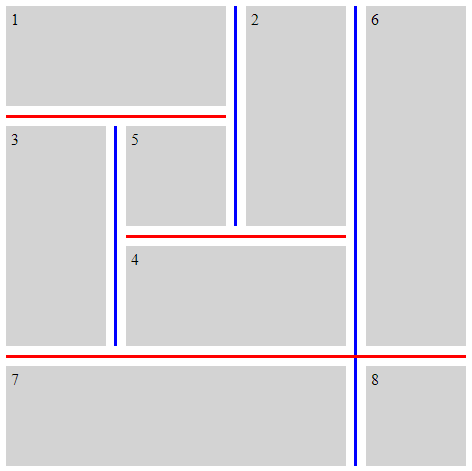
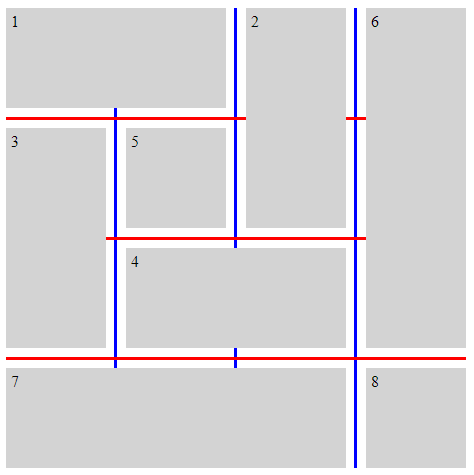
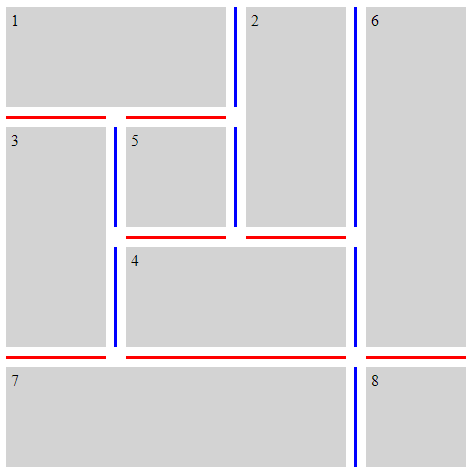
これらのプロパティは、コンテナー内の項目によって形成される可視の“T”または“cross”交差点で、 与えられたギャップ内の装飾をセグメントへ分断する挙動を設定する。 これらの値をどのように適用するかの正確な詳細は、ギャップ装飾 セグメントを決定する手順で与えられる。
- none
- ギャップ装飾は、可視の“T”または“cross”交差点で開始または終了しない。 代わりに、ギャップの一端から他端まで単一の連続した装飾が描画される。
- normal
-
挙動はコンテナーの型に依存する。
- グリッドコンテナー
- ギャップ装飾は可視の“T”交差点で開始および終了するが、 可視の“cross”交差点は通過して継続する。
- フレックスコンテナー
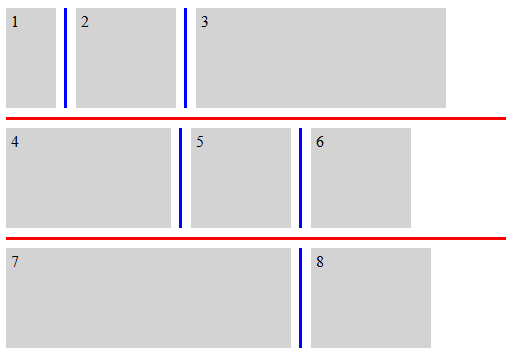
- noneと同じように振る舞う。
- マルチカラムコンテナー
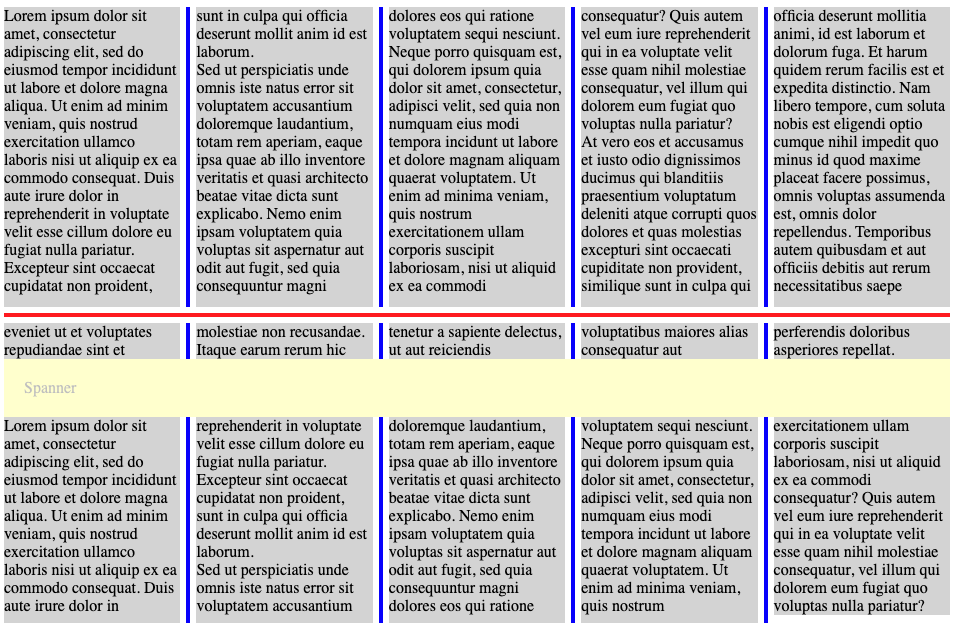
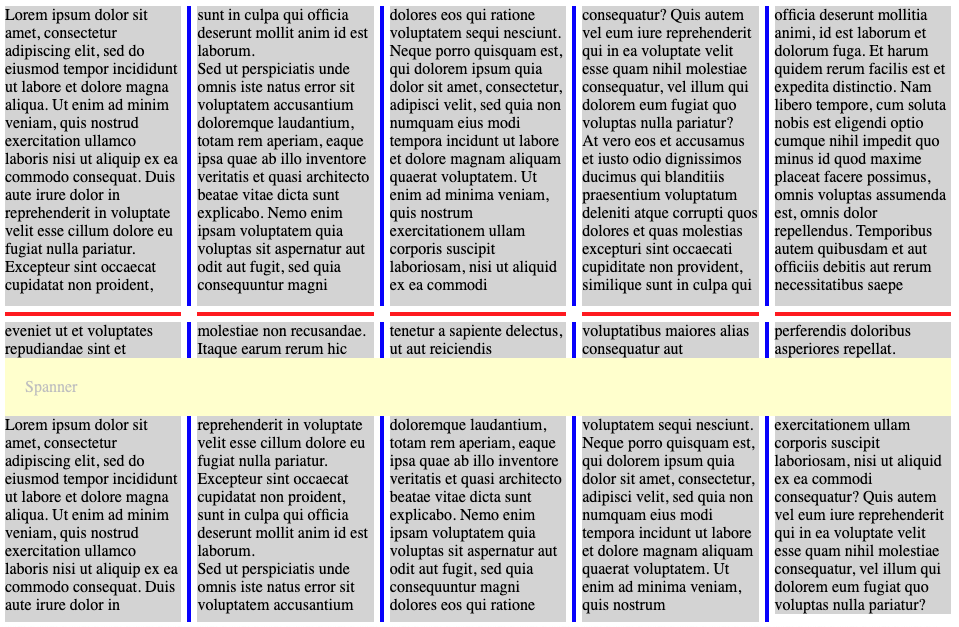
- column-rule-breakでは、intersectionと同じように振る舞う。 row-rule-breakでは、noneと同じように振る舞う。
- intersection
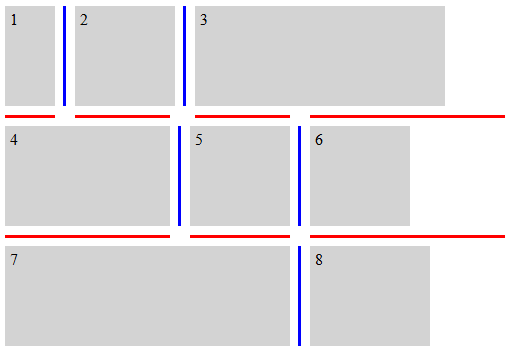
- ギャップ装飾は可視の“T”および“cross”交差点で開始および終了する。
テスト
- flex-gap-decorations-009.html (ライブ テスト) (ソース)
- flex-gap-decorations-010.html (ライブ テスト) (ソース)
- flex-gap-decorations-028.html (ライブ テスト) (ソース)
- flex-gap-decorations-031.html (ライブ テスト) (ソース)
- flex-gap-decorations-034.html (ライブ テスト) (ソース)
- flex-gap-decorations-035.html (ライブ テスト) (ソース)
- flex-gap-decorations-036.html (ライブ テスト) (ソース)
- flex-gap-decorations-037.html (ライブ テスト) (ソース)
- flex-gap-decorations-050.html (ライブ テスト) (ソース)
- flex-gap-decorations-051.html (ライブ テスト) (ソース)
- flex-gap-decorations-052.html (ライブ テスト) (ソース)
- grid-gap-decorations-006.html (ライブ テスト) (ソース)
- grid-gap-decorations-007.html (ライブ テスト) (ソース)
- grid-gap-decorations-008.html (ライブ テスト) (ソース)
- grid-gap-decorations-009.html (ライブ テスト) (ソース)
- grid-gap-decorations-040.html (ライブ テスト) (ソース)
- subgrid-gap-decorations-004.html (ライブ テスト) (ソース)
- subgrid-gap-decorations-005.html (ライブ テスト) (ソース)
- subgrid-gap-decorations-006.html (ライブ テスト) (ソース)
- multicol-gap-decorations-014.html (ライブ テスト) (ソース)
- multicol-gap-decorations-020.html (ライブ テスト) (ソース)
- multicol-gap-decorations-025.html (ライブ テスト) (ソース)
- multicol-gap-decorations-026.html (ライブ テスト) (ソース)
- multicol-gap-decorations-034.html (ライブ テスト) (ソース)
| 名前: | rule-break |
|---|---|
| 値: | <'column-rule-break'> |
| 初期値: | 各個別プロパティを参照 |
| 適用対象: | column-rule-breakおよびrow-rule-breakと同じ |
| 継承: | 各個別プロパティを参照 |
| パーセンテージ: | 各個別プロパティを参照 |
| 算出値: | 各個別プロパティを参照 |
| アニメーション型: | 各個別プロパティを参照 |
| 正準順序: | 文法に従う |
この一括指定プロパティは、column-rule-breakおよびrow-rule-breakを同じ値に設定する。
テスト
次の例は、*-rule-breakプロパティのさまざまな設定を示す。
.break-normal-grid {
  display: grid;
  grid-template: repeat(4, 100px) / repeat(4, 100px);
  gap: 20px;
  row-rule: 6px solid red;
  column-rule: 6px solid blue;
  rule-break: normal;
}
.break-none-grid {
  display: grid;
  grid-template: repeat(4, 100px) / repeat(4, 100px);
  gap: 20px;
  row-rule: 6px solid red;
  column-rule: 6px solid blue;
  rule-break: none;
}
.break-intersection-grid {
  display: grid;
  grid-template: repeat(4, 100px) / repeat(4, 100px);
  gap: 20px;
  row-rule: 6px solid red;
  column-rule: 6px solid blue;
  rule-break: intersection;
}
.break-normal-multicol {
  column-width: 150px;
  column-height: 300px;
  gap: 1em;
  row-rule: 4px solid red;
  column-rule: 4px solid blue;
  rule-break: normal;
}
.break-intersection-multicol {
  column-width: 150px;
  column-height: 300px;
  gap: 1em;
  row-rule: 4px solid red;
  column-rule: 4px solid blue;
  rule-break: intersection;
}
.break-normal-flex {
  display: flex;
  flex-wrap: wrap;
  gap: 20px;
  row-rule: 6px solid red;
  column-rule: 6px solid blue;
  rule-break: normal;
}
.break-intersection-flex {
  display: flex;
  flex-wrap: wrap;
  width: 500px;
  gap: 20px;
  row-rule: 6px solid red;
  column-rule: 6px solid blue;
  rule-break: intersection;
}
3.3. ギャップ装飾端点の調整: rule-insetプロパティ
| 名前: | column-rule-inset-cap-start, column-rule-inset-cap-end, column-rule-inset-junction-start, column-rule-inset-junction-end, row-rule-inset-cap-start, row-rule-inset-cap-end, row-rule-inset-junction-start, row-rule-inset-junction-end |
|---|---|
| 値: | <inset-value> |
| 初期値: | 0 |
| 適用対象: | グリッドコンテナー、フレックス コンテナー、マルチカラムコンテナー、およびグリッドレーンコンテナー |
| 継承: | no |
| パーセンテージ: | 交差ギャップ幅を基準とする |
| 算出値: | 指定どおり |
| 正準順序: | 文法に従う |
| アニメーション型: | 算出値の型による |
<inset-value> = <length-percentage> | overlap-join
これらのプロパティは、通常であれば装飾の開始位置および終了位置を決定する セグメント端点に対して、 ギャップ装飾の開始点および終了点をオフセットするために使用できる。
接合セグメント 端点とは、ギャップ接合部にあるセグメント端点であり、 そこには1つ以上の他のギャップ装飾セグメントも存在する。
キャップセグメント 端点とは、接合セグメント端点ではない任意のセグメント端点である。 これにはコンテナーのコンテンツ辺にある端点、 および他のギャップ装飾セグメントが存在しないギャップ 接合部にある端点が含まれる。
.simple-grid {
  rule-break: intersection;
  rule-visibility-items: between;
}
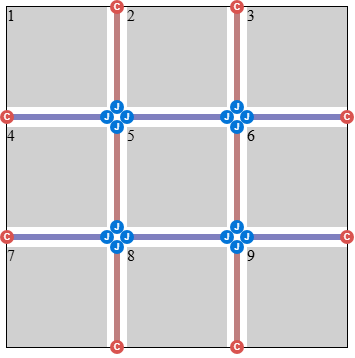
.simple-grid-with-empty-cells {
  rule-break: intersection;
  rule-visibility-items: between;
}
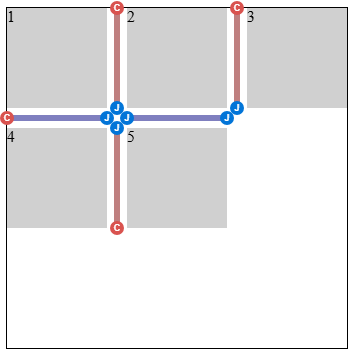
.donut-grid-layout {
  rule-break: intersection;
  rule-visibility-items: between;
}
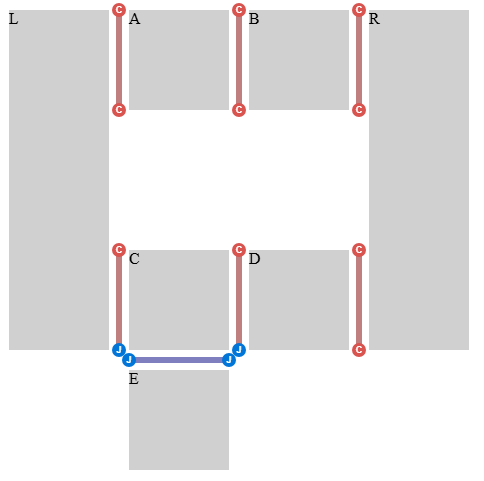
パーセンテージは、次のように定義される交差ギャップ幅を基準に解決される:
- ギャップ 接合部にあるセグメント端点
-
交差ギャップ
幅は、セグメント端点が
位置するギャップと同じ次元における
ギャップ接合部のサイズである
(行ギャップでは行次元、
列
ギャップでは列次元)。
注: 通常、これは、交差または接するギャップに適用される方の column-gapまたはrow-gap プロパティの使用値に、 justify-contentまたはalign-contentによって追加された任意の追加間隔を加えたものとなる。 ただし、ギャップが重なる区間で互いに交差または接する場合、 交差ギャップ 幅は、そのような区間の和集合により決定される。 そのような場合の1つについては、この例を参照。
- その他のセグメント端点
- 交差ギャップ 幅は0である。
注: 位置によるこの分類は、 キャップセグメント 端点/接合セグメント端点の分類とは別である。 キャップセグメント端点は、コンテナー辺またはギャップ接合部 に位置する場合がある (この例を参照)。したがって、 column-rule-inset-cap-start: 50%は、内部キャップでは ギャップ接合部の サイズの半分に解決され、コンテナー辺などその他のキャップでは0に解決される。
column-rule-inset-cap-startおよびrow-rule-inset-cap-startプロパティは、 キャップセグメント端点である開始セグメント 端点に適用される。 column-rule-inset-junction-startおよびrow-rule-inset-junction-startプロパティは、 接合セグメント 端点である開始セグメント端点に適用される。 これらのプロパティについて、正の値はギャップの軸に沿ってend方向にオフセットし、 負の値はstart方向にオフセットする。
column-rule-inset-cap-endおよびrow-rule-inset-cap-endプロパティは、 キャップセグメント端点である終了セグメント 端点に適用される。 column-rule-inset-junction-endおよびrow-rule-inset-junction-endプロパティは、 接合セグメント 端点である終了セグメント端点に適用される。 これらのプロパティについて、正の値はギャップの軸に沿ってstart方向にオフセットし、 負の値はend方向にオフセットする。
overlap-joinキーワードは、 同じギャップ接合部で出会うギャップ 装飾の間に整った接合を生成する:
- 接合セグメント端点では、ギャップ装飾は、 交差 ギャップ幅の半分に、 交差ギャップのcolumn-rule-widthまたはrow-rule-width(適用される方)の使用値の半分を加えた量だけ、 ギャップ接合部内へ延びる。
- キャップセグメント 端点では、overlap-joinは0として扱われる。
.inset-overlap-join {
  rule-inset: overlap-join;
  rule-break: intersection;
  rule-visibility-items: between;
}
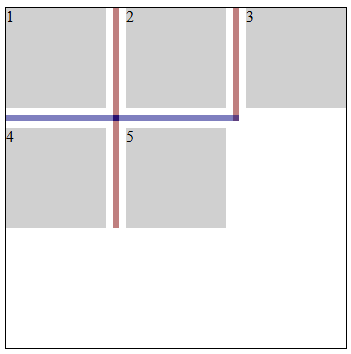
.inset-overlap-join {
  rule-inset: overlap-join;
  rule-break: intersection;
  rule-visibility-items: between;
}
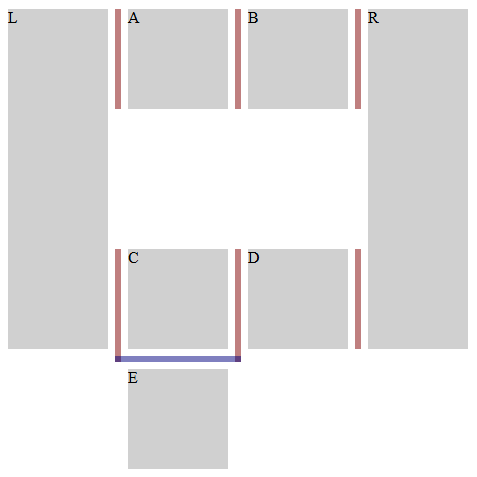
.inset-end {
  row-rule: 3px solid red;
  row-rule-break: intersection;
  row-rule-inset-end: 10px;
}
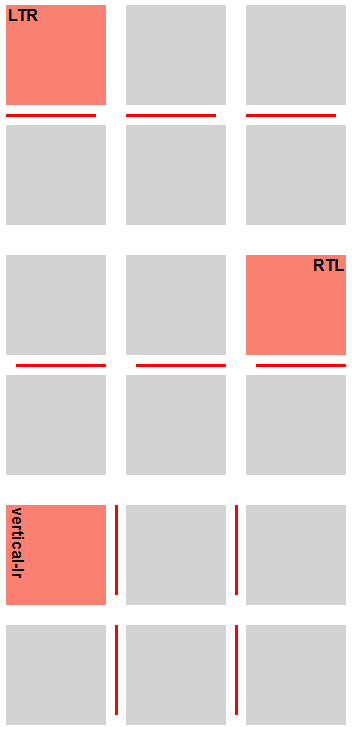
テスト
- flex-gap-decorations-011.html (ライブ テスト) (ソース)
- flex-gap-decorations-013.html (ライブ テスト) (ソース)
- flex-gap-decorations-014.html (ライブ テスト) (ソース)
- flex-gap-decorations-029.html (ライブ テスト) (ソース)
- flex-gap-decorations-030.html (ライブ テスト) (ソース)
- flex-gap-decorations-053.html (ライブ テスト) (ソース)
- flex-gap-decorations-054.html (ライブ テスト) (ソース)
- flex-gap-decorations-055.html (ライブ テスト) (ソース)
- flex-gap-decorations-063.html (ライブ テスト) (ソース)
- flex-gap-decorations-064.html (ライブ テスト) (ソース)
- flex-gap-decorations-065.html (ライブ テスト) (ソース)
- flex-gap-decorations-066.html (ライブ テスト) (ソース)
- flex-gap-decorations-067.html (ライブ テスト) (ソース)
- flex-gap-decorations-direction-inset.html (ライブ テスト) (ソース)
- grid-gap-decorations-010.html (ライブ テスト) (ソース)
- grid-gap-decorations-011.html (ライブ テスト) (ソース)
- grid-gap-decorations-012.html (ライブ テスト) (ソース)
- grid-gap-decorations-013.html (ライブ テスト) (ソース)
- grid-gap-decorations-014.html (ライブ テスト) (ソース)
- grid-gap-decorations-015.html (ライブ テスト) (ソース)
- grid-gap-decorations-038.html (ライブ テスト) (ソース)
- grid-gap-decorations-052.html (ライブ テスト) (ソース)
- grid-gap-decorations-053.html (ライブ テスト) (ソース)
- grid-gap-decorations-067.html (ライブ テスト) (ソース)
- grid-gap-decorations-068.html (ライブ テスト) (ソース)
- grid-gap-decorations-069.html (ライブ テスト) (ソース)
- grid-gap-decorations-070.html (ライブ テスト) (ソース)
- grid-gap-decorations-071.html (ライブ テスト) (ソース)
- grid-gap-decorations-072.html (ライブ テスト) (ソース)
- grid-gap-decorations-073.html (ライブ テスト) (ソース)
- grid-gap-decorations-074.html (ライブ テスト) (ソース)
- grid-gap-decorations-075.html (ライブ テスト) (ソース)
- grid-gap-decorations-076.html (ライブ テスト) (ソース)
- grid-gap-decorations-077.html (ライブ テスト) (ソース)
- grid-gap-decorations-078.html (ライブ テスト) (ソース)
- grid-gap-decorations-079.html (ライブ テスト) (ソース)
- grid-gap-decorations-080.html (ライブ テスト) (ソース)
- grid-gap-decorations-081.html (ライブ テスト) (ソース)
- grid-gap-decorations-082.html (ライブ テスト) (ソース)
- grid-gap-decorations-090.html (ライブ テスト) (ソース)
- grid-gap-decorations-091.html (ライブ テスト) (ソース)
- grid-gap-decorations-092.html (ライブ テスト) (ソース)
- grid-gap-decorations-direction-inset.html (ライブ テスト) (ソース)
- subgrid-gap-decorations-007.html (ライブ テスト) (ソース)
- subgrid-gap-decorations-008.html (ライブ テスト) (ソース)
- multicol-gap-decorations-008.html (ライブ テスト) (ソース)
- multicol-gap-decorations-009.html (ライブ テスト) (ソース)
- multicol-gap-decorations-010.html (ライブ テスト) (ソース)
- multicol-gap-decorations-011.html (ライブ テスト) (ソース)
- multicol-gap-decorations-012.html (ライブ テスト) (ソース)
- multicol-gap-decorations-017.html (ライブ テスト) (ソース)
- multicol-gap-decorations-022.html (ライブ テスト) (ソース)
- multicol-gap-decorations-023.html (ライブ テスト) (ソース)
- multicol-gap-decorations-033.html (ライブ テスト) (ソース)
- multicol-gap-decorations-036.html (ライブ テスト) (ソース)
- multicol-gap-decorations-037.html (ライブ テスト) (ソース)
- multicol-gap-decorations-038.html (ライブ テスト) (ソース)
- multicol-gap-decorations-039.html (ライブ テスト) (ソース)
- multicol-gap-decorations-direction-inset.html (ライブ テスト) (ソース)
- rule-inset-cap-start-end-computed.html (ライブ テスト) (ソース)
- rule-inset-cap-start-end-invalid.html (ライブ テスト) (ソース)
- rule-inset-junction-start-end-computed.html (ライブ テスト) (ソース)
- rule-inset-junction-start-end-invalid.html (ライブ テスト) (ソース)
3.3.1. -startおよび-end一括指定
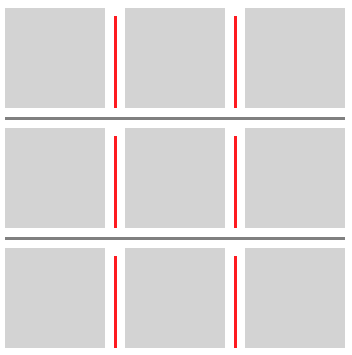
これらの一括指定により、作者は一様な非対称の装飾を実現できる。
.inset-start-8px-end-0px {
  column-rule-inset-start: 8px;
  column-rule-inset-end: 0px;
}
| 名前: | column-rule-inset-start, column-rule-inset-end, row-rule-inset-start, row-rule-inset-end |
|---|---|
| 値: | <inset-value> |
| 初期値: | 各個別プロパティを参照 |
| 適用対象: | column-rule-inset-cap-start、column-rule-inset-junction-start、 column-rule-inset-cap-end、column-rule-inset-junction-end、row-rule-inset-cap-start、row-rule-inset-junction-start、row-rule-inset-cap-end、およびrow-rule-inset-junction-endと同じ |
| 継承: | 各個別プロパティを参照 |
| パーセンテージ: | 各個別プロパティを参照 |
| 算出値: | 各個別プロパティを参照 |
| アニメーション型: | 各個別プロパティを参照 |
| 正準順序: | 文法に従う |
これらの一括指定プロパティは、対応する-cap-プロパティおよび-junction-プロパティを同じ値に設定する。 たとえば、column-rule-inset-startは、column-rule-inset-cap-startとcolumn-rule-inset-junction-startの両方を同じ 値に設定する。
| 名前: | rule-inset-start |
|---|---|
| 値: | <'column-rule-inset-start'> |
| 初期値: | 各個別プロパティを参照 |
| 適用対象: | column-rule-inset-startおよびrow-rule-inset-startと同じ |
| 継承: | 各個別プロパティを参照 |
| パーセンテージ: | 各個別プロパティを参照 |
| 算出値: | 各個別プロパティを参照 |
| アニメーション型: | 各個別プロパティを参照 |
| 正準順序: | 文法に従う |
この一括指定プロパティは、column-rule-inset-startおよびrow-rule-inset-startを同じ値に設定する。
| 名前: | rule-inset-end |
|---|---|
| 値: | <'column-rule-inset-end'> |
| 初期値: | 各個別プロパティを参照 |
| 適用対象: | column-rule-inset-endおよびrow-rule-inset-endと同じ |
| 継承: | 各個別プロパティを参照 |
| パーセンテージ: | 各個別プロパティを参照 |
| 算出値: | 各個別プロパティを参照 |
| アニメーション型: | 各個別プロパティを参照 |
| 正準順序: | 文法に従う |
この一括指定プロパティは、column-rule-inset-endおよびrow-rule-inset-endを同じ値に設定する。
テスト
3.3.2. -cap-および-junction-一括指定
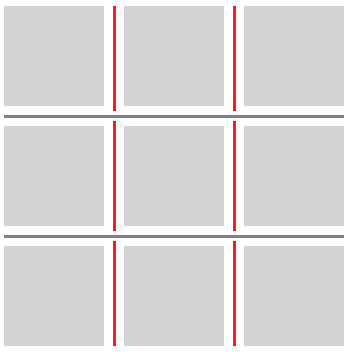
これらの一括指定により、作者はキャップセグメント端点と接合 セグメント端点で異なる処理を実現できる。
.inset-cap-0px-inset-junction-negative-5px {
  column-rule-inset-cap: 0px;
  column-rule-inset-junction: -5px;
  column-rule-break: intersection;
}
| 名前: | column-rule-inset-cap, column-rule-inset-junction, row-rule-inset-cap, row-rule-inset-junction |
|---|---|
| 値: | <inset-value> <inset-value>? |
| 初期値: | 各個別プロパティを参照 |
| 適用対象: | column-rule-inset-cap-start、column-rule-inset-cap-end、column-rule-inset-junction-start、 column-rule-inset-junction-end、row-rule-inset-cap-start、row-rule-inset-cap-end、row-rule-inset-junction-start、および row-rule-inset-junction-endと同じ |
| 継承: | 各個別プロパティを参照 |
| パーセンテージ: | 各個別プロパティを参照 |
| 算出値: | 各個別プロパティを参照 |
| アニメーション型: | 各個別プロパティを参照 |
| 正準順序: | 文法に従う |
これらの一括指定は、対応する-startプロパティおよび-end プロパティを設定する。 たとえば、column-rule-inset-capは、column-rule-inset-cap-startとcolumn-rule-inset-cap-endの両方を設定する。 1つの値が指定された場合、両方のプロパティがその値に設定される。 2つの値が指定された場合、-startは1番目に、-endは2番目に設定される。
| 名前: | rule-inset-cap |
|---|---|
| 値: | <'column-rule-inset-cap'> |
| 初期値: | 各個別プロパティを参照 |
| 適用対象: | column-rule-inset-capおよびrow-rule-inset-capと同じ |
| 継承: | 各個別プロパティを参照 |
| パーセンテージ: | 各個別プロパティを参照 |
| 算出値: | 各個別プロパティを参照 |
| アニメーション型: | 各個別プロパティを参照 |
| 正準順序: | 文法に従う |
この一括指定プロパティは、column-rule-inset-capおよびrow-rule-inset-capを同じ値に設定する。
| 名前: | rule-inset-junction |
|---|---|
| 値: | <'column-rule-inset-junction'> |
| 初期値: | 各個別プロパティを参照 |
| 適用対象: | column-rule-inset-junctionおよびrow-rule-inset-junctionと同じ |
| 継承: | 各個別プロパティを参照 |
| パーセンテージ: | 各個別プロパティを参照 |
| 算出値: | 各個別プロパティを参照 |
| アニメーション型: | 各個別プロパティを参照 |
| 正準順序: | 文法に従う |
この一括指定プロパティは、column-rule-inset-junctionおよびrow-rule-inset-junctionを同じ値に設定する。
テスト
- rule-inset-cap-bidirectional-shorthand.html (ライブ テスト) (ソース)
- rule-inset-cap-junction-computed.html (ライブ テスト) (ソース)
- rule-inset-cap-junction-invalid.html (ライブ テスト) (ソース)
- rule-inset-cap-junction-shorthand.html (ライブ テスト) (ソース)
- rule-inset-cap-junction-valid.html (ライブ テスト) (ソース)
- rule-inset-junction-bidirectional-shorthand.html (ライブ テスト) (ソース)
3.3.3. 汎用一括指定
これらの一括指定により、作者はコンテナー全体にわたって一様な処理を実現できる。
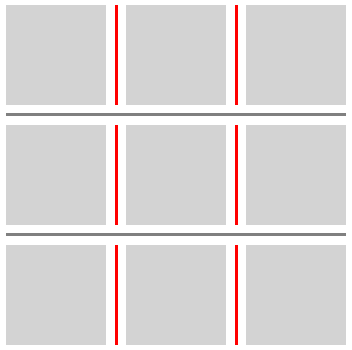
.inset-0px {
  column-rule-inset: 0px;
  column-rule-break: intersection;
}
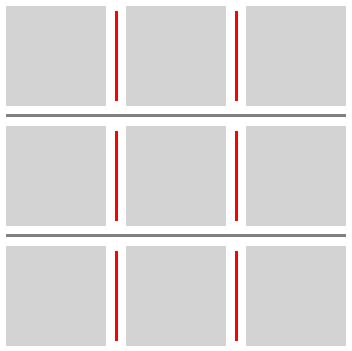
.inset-positive-5px {
  column-rule-inset: 5px;
  column-rule-break: intersection;
}
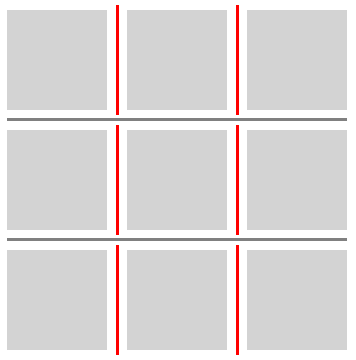
.inset-negative-5px {
  column-rule-inset: -5px;
  column-rule-break: intersection;
}
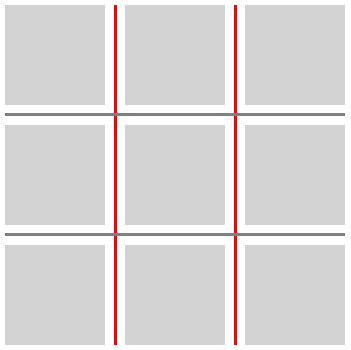
.inset-negative-50percent {
  column-rule-inset: -50%;
  column-rule-break: intersection;
}
| 名前: | column-rule-inset, row-rule-inset |
|---|---|
| 値: | <'column-rule-inset-cap'> [ / <'column-rule-inset-junction'> ]? |
| 初期値: | 各個別プロパティを参照 |
| 適用対象: | column-rule-inset-cap、column-rule-inset-junction、row-rule-inset-cap、およびrow-rule-inset-junctionと同じ |
| 継承: | 各個別プロパティを参照 |
| パーセンテージ: | 各個別プロパティを参照 |
| 算出値: | 各個別プロパティを参照 |
| アニメーション型: | 各個別プロパティを参照 |
| 正準順序: | 文法に従う |
これらの一括指定は、対応するキャップおよび接合の開始値と終了値を設定する。 値の順序は次のとおりである:
cap-start cap-end? [/ junction-start junction-end?]?
省略された値は、次のように補われる:
- 接合値が省略された場合、それらはキャップ値からコピーされる。
- 省略された終了値は、対応する開始値からコピーされる。
| 名前: | rule-inset |
|---|---|
| 値: | <'column-rule-inset'> |
| 初期値: | 各個別プロパティを参照 |
| 適用対象: | column-rule-insetおよびrow-rule-insetと同じ |
| 継承: | 各個別プロパティを参照 |
| パーセンテージ: | 各個別プロパティを参照 |
| 算出値: | 各個別プロパティを参照 |
| アニメーション型: | 各個別プロパティを参照 |
| 正準順序: | 文法に従う |
この一括指定プロパティは、column-rule-insetおよびrow-rule-insetを同じ値に設定する。
テスト
3.4. ギャップ装飾の可視性: rule-visibility-itemsプロパティ
| 名前: | column-rule-visibility-items, row-rule-visibility-items |
|---|---|
| 値: | all | around | between | normal |
| 初期値: | normal |
| 適用対象: | グリッドコンテナーおよびマルチカラムコンテナー |
| 継承: | no |
| パーセンテージ: | 該当なし |
| 算出値: | 指定どおり |
| 正準順序: | 文法に従う |
| アニメーション型: | 離散 |
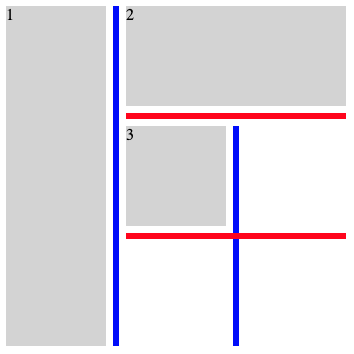
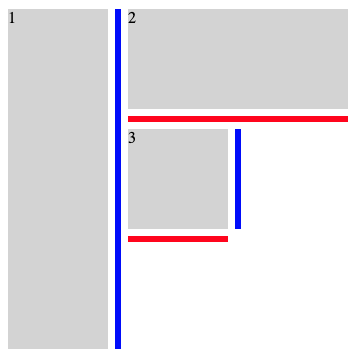
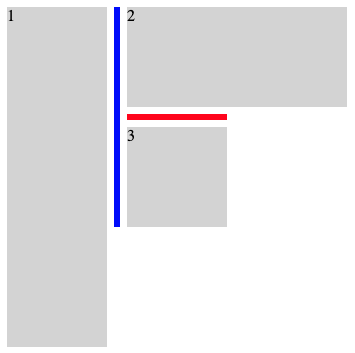
これらのプロパティは、空の領域に隣接するギャップの部分で、 ギャップ装飾セグメントを描画するかどうかを制御する。
- all
- 隣接する項目が存在するかどうかにかかわらず、すべてのギャップセグメント内に装飾を描画する。
- around
- 2つの隣接領域の少なくとも一方が項目で占有されている場合に、ギャップセグメント内に装飾を描画する。
- between
- 両方の隣接領域が項目で占有されている場合に、ギャップセグメント内に装飾を描画する。
- normal
-
挙動はコンテナーの型に依存する。
- グリッドコンテナー
- allと同じように振る舞う。
- マルチカラムコンテナー
- column-rule-visibility-itemsでは、 betweenと同じように振る舞う。 row-rule-visibility-itemsでは、 allと同じように振る舞う。
| 名前: | rule-visibility-items |
|---|---|
| 値: | <'column-rule-visibility-items'> |
| 初期値: | 各個別プロパティを参照 |
| 適用対象: | column-rule-visibility-itemsおよびrow-rule-visibility-itemsと同じ |
| 継承: | 各個別プロパティを参照 |
| パーセンテージ: | 各個別プロパティを参照 |
| 算出値: | 各個別プロパティを参照 |
| アニメーション型: | 各個別プロパティを参照 |
| 正準順序: | 文法に従う |
この一括指定プロパティは、column-rule-visibility-itemsおよびrow-rule-visibility-itemsを同じ値に設定する。
.break-normal-with-all-grid {
  display: grid;
  grid-template: repeat(3, 100px) / repeat(3, 100px);
  gap: 20px;
  row-rule: 6px solid red;
  column-rule: 6px solid blue;
  rule-visibility-items: all;
}
.break-normal-with-around-grid {
  display: grid;
  grid-template: repeat(3, 100px) / repeat(3, 100px);
  gap: 20px;
  row-rule: 6px solid red;
  column-rule: 6px solid blue;
  rule-visibility-items: around;
}
.break-normal-with-between-grid {
  display: grid;
  grid-template: repeat(3, 100px) / repeat(3, 100px);
  gap: 20px;
  row-rule: 6px solid red;
  column-rule: 6px solid blue;
  rule-visibility-items: between;
}
テスト
- grid-gap-decorations-fragmentation-025.html (ライブ テスト) (ソース)
- grid-gap-decorations-fragmentation-026.html (ライブ テスト) (ソース)
- grid-gap-decorations-fragmentation-027.html (ライブ テスト) (ソース)
- grid-gap-decorations-054.html (ライブ テスト) (ソース)
- grid-gap-decorations-055.html (ライブ テスト) (ソース)
- grid-gap-decorations-056.html (ライブ テスト) (ソース)
- grid-gap-decorations-057.html (ライブ テスト) (ソース)
- grid-gap-decorations-064.html (ライブ テスト) (ソース)
- grid-gap-decorations-065.html (ライブ テスト) (ソース)
- subgrid-gap-decorations-019.html (ライブ テスト) (ソース)
- subgrid-gap-decorations-020.html (ライブ テスト) (ソース)
- subgrid-gap-decorations-021.html (ライブ テスト) (ソース)
- subgrid-gap-decorations-022.html (ライブ テスト) (ソース)
- subgrid-gap-decorations-023.html (ライブ テスト) (ソース)
- subgrid-gap-decorations-024.html (ライブ テスト) (ソース)
- subgrid-gap-decorations-025.html (ライブ テスト) (ソース)
- multicol-gap-decorations-027.html (ライブ テスト) (ソース)
- multicol-gap-decorations-028.html (ライブ テスト) (ソース)
- multicol-gap-decorations-029.html (ライブ テスト) (ソース)
- multicol-gap-decorations-030.html (ライブ テスト) (ソース)
- multicol-gap-decorations-031.html (ライブ テスト) (ソース)
- multicol-gap-decorations-032.html (ライブ テスト) (ソース)
- multicol-gap-decorations-035.html (ライブ テスト) (ソース)
- rule-visibility-items-computed.html (ライブ テスト) (ソース)
- rule-visibility-items-invalid.html (ライブ テスト) (ソース)
- rule-visibility-items-shorthand.html (ライブ テスト) (ソース)
- rule-visibility-items-valid.html (ライブ テスト) (ソース)
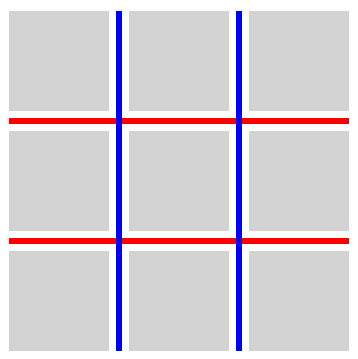
3.5. ギャップ装飾の重なり: rule-overlapプロパティ
| 名前: | rule-overlap |
|---|---|
| 値: | row-over-column | column-over-row |
| 初期値: | row-over-column |
| 適用対象: | グリッドコンテナー、フレックス コンテナー、およびグリッドレーンコンテナー |
| 継承: | no |
| パーセンテージ: | 該当なし |
| 算出値: | 指定どおり |
| 正準順序: | 文法に従う |
| アニメーション型: | 離散 |
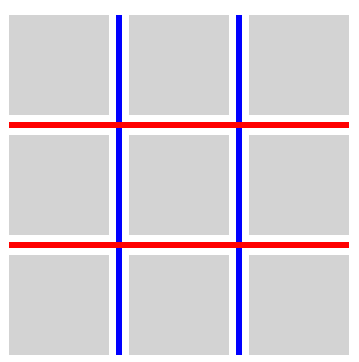
このプロパティは、重なり合うギャップ装飾の描画順を設定する。
- row-over-column
- 行方向の装飾が列方向の装飾より上に描画される。
- column-over-row
- 列方向の装飾が行方向の装飾より上に描画される。
.row-over-column {
  rule-overlap: row-over-column;
  row-rule: 6px solid red;
  column-rule: 6px solid blue;
}
.column-over-row {
  rule-overlap: column-over-row;
  row-rule: 6px solid red;
  column-rule: 6px solid blue;
}
テスト
3.6. 断片化
CSS Box Alignment 3 § 8.1 行および 列のガター: row-gapおよびcolumn-gapプロパティは、ギャップが断片化分断と一致する場所では消滅することを規定している。 そのような位置にはギャップが存在しないため、 ギャップ装飾もそこには描画されない。
テスト
- flex-gap-decorations-fragmentation-001.html (ライブ テスト) (ソース)
- flex-gap-decorations-fragmentation-002.html (ライブ テスト) (ソース)
- flex-gap-decorations-fragmentation-003.html (ライブ テスト) (ソース)
- flex-gap-decorations-fragmentation-004.html (ライブ テスト) (ソース)
- flex-gap-decorations-fragmentation-005.html (ライブ テスト) (ソース)
- flex-gap-decorations-fragmentation-006.html (ライブ テスト) (ソース)
- flex-gap-decorations-fragmentation-007.html (ライブ テスト) (ソース)
- flex-gap-decorations-fragmentation-008.html (ライブ テスト) (ソース)
- flex-gap-decorations-fragmentation-009.html (ライブ テスト) (ソース)
- flex-gap-decorations-fragmentation-010.html (ライブ テスト) (ソース)
- flex-gap-decorations-fragmentation-011.html (ライブ テスト) (ソース)
- flex-gap-decorations-fragmentation-012.html (ライブ テスト) (ソース)
- flex-gap-decorations-fragmentation-013.html (ライブ テスト) (ソース)
- flex-gap-decorations-fragmentation-014.html (ライブ テスト) (ソース)
- flex-gap-decorations-fragmentation-015.html (ライブ テスト) (ソース)
- flex-gap-decorations-fragmentation-016.html (ライブ テスト) (ソース)
- flex-gap-decorations-fragmentation-017.html (ライブ テスト) (ソース)
- flex-gap-decorations-fragmentation-018.html (ライブ テスト) (ソース)
- flex-gap-decorations-fragmentation-019.html (ライブ テスト) (ソース)
- flex-gap-decorations-fragmentation-020.html (ライブ テスト) (ソース)
- flex-gap-decorations-fragmentation-021.html (ライブ テスト) (ソース)
- flex-gap-decorations-fragmentation-022-crash.html (ライブ テスト) (ソース)
- flex-gap-decorations-fragmentation-026.html (ライブ テスト) (ソース)
- grid-gap-decorations-fragmentation-001.html (ライブ テスト) (ソース)
- grid-gap-decorations-fragmentation-002.html (ライブ テスト) (ソース)
- grid-gap-decorations-fragmentation-003.html (ライブ テスト) (ソース)
- grid-gap-decorations-fragmentation-004.html (ライブ テスト) (ソース)
- grid-gap-decorations-fragmentation-005.html (ライブ テスト) (ソース)
- grid-gap-decorations-fragmentation-006.html (ライブ テスト) (ソース)
- grid-gap-decorations-fragmentation-007.html (ライブ テスト) (ソース)
- grid-gap-decorations-fragmentation-008.html (ライブ テスト) (ソース)
- grid-gap-decorations-fragmentation-009.html (ライブ テスト) (ソース)
- grid-gap-decorations-fragmentation-010.html (ライブ テスト) (ソース)
- grid-gap-decorations-fragmentation-011.html (ライブ テスト) (ソース)
- grid-gap-decorations-fragmentation-012.html (ライブ テスト) (ソース)
- grid-gap-decorations-fragmentation-013.html (ライブ テスト) (ソース)
- grid-gap-decorations-fragmentation-014.html (ライブ テスト) (ソース)
- grid-gap-decorations-fragmentation-015.html (ライブ テスト) (ソース)
- grid-gap-decorations-fragmentation-016.html (ライブ テスト) (ソース)
- grid-gap-decorations-fragmentation-017.html (ライブ テスト) (ソース)
- grid-gap-decorations-fragmentation-018-crash.html (ライブ テスト) (ソース)
- grid-gap-decorations-fragmentation-019-crash.html (ライブ テスト) (ソース)
- grid-gap-decorations-fragmentation-020.html (ライブ テスト) (ソース)
- grid-gap-decorations-fragmentation-021.html (ライブ テスト) (ソース)
- grid-gap-decorations-fragmentation-022.html (ライブ テスト) (ソース)
- grid-gap-decorations-fragmentation-023.html (ライブ テスト) (ソース)
- grid-gap-decorations-fragmentation-024.html (ライブ テスト) (ソース)
- grid-gap-decorations-fragmentation-025.html (ライブ テスト) (ソース)
- grid-gap-decorations-fragmentation-026.html (ライブ テスト) (ソース)
- grid-gap-decorations-fragmentation-027.html (ライブ テスト) (ソース)
- grid-gap-decorations-fragmentation-028.html (ライブ テスト) (ソース)
- grid-gap-decorations-fragmentation-029.html (ライブ テスト) (ソース)
- grid-gap-decorations-fragmentation-030.html (ライブ テスト) (ソース)
- grid-gap-decorations-fragmentation-031.html (ライブ テスト) (ソース)
- grid-gap-decorations-fragmentation-032.html (ライブ テスト) (ソース)
- grid-gap-decorations-fragmentation-033.html (ライブ テスト) (ソース)
- grid-gap-decorations-fragmentation-036.html (ライブ テスト) (ソース)
- grid-gap-decorations-fragmentation-037.html (ライブ テスト) (ソース)
- subgrid-gap-decorations-fragmentation-001.html (ライブ テスト) (ソース)
- subgrid-gap-decorations-fragmentation-002.html (ライブ テスト) (ソース)
- subgrid-gap-decorations-fragmentation-003.html (ライブ テスト) (ソース)
- subgrid-gap-decorations-fragmentation-004.html (ライブ テスト) (ソース)
- subgrid-gap-decorations-fragmentation-005.html (ライブ テスト) (ソース)
- subgrid-gap-decorations-fragmentation-006.html (ライブ テスト) (ソース)
- subgrid-gap-decorations-fragmentation-007.html (ライブ テスト) (ソース)
- subgrid-gap-decorations-fragmentation-008.html (ライブ テスト) (ソース)
- subgrid-gap-decorations-fragmentation-009.html (ライブ テスト) (ソース)
- subgrid-gap-decorations-fragmentation-010.html (ライブ テスト) (ソース)
- subgrid-gap-decorations-fragmentation-011.html (ライブ テスト) (ソース)
- subgrid-gap-decorations-fragmentation-012.html (ライブ テスト) (ソース)
- subgrid-gap-decorations-fragmentation-013.html (ライブ テスト) (ソース)
- subgrid-gap-decorations-fragmentation-014.html (ライブ テスト) (ソース)
- subgrid-gap-decorations-fragmentation-015.html (ライブ テスト) (ソース)
- subgrid-gap-decorations-fragmentation-016.html (ライブ テスト) (ソース)
- subgrid-gap-decorations-fragmentation-017.html (ライブ テスト) (ソース)
- subgrid-gap-decorations-fragmentation-018.html (ライブ テスト) (ソース)
- subgrid-gap-decorations-fragmentation-019.html (ライブ テスト) (ソース)
- subgrid-gap-decorations-fragmentation-020.html (ライブ テスト) (ソース)
- subgrid-gap-decorations-fragmentation-021.html (ライブ テスト) (ソース)
- subgrid-gap-decorations-fragmentation-022.html (ライブ テスト) (ソース)
4. 色、スタイル、および幅
この節のプロパティ定義は、 [CSS-MULTICOL-1]における同名のプロパティ定義を置き換える。
4.1. ギャップ装飾の色: column-rule-color、row-rule-color、およびrule-color プロパティ
| 名前: | column-rule-color, row-rule-color |
|---|---|
| 値: | <line-color-list> | <auto-line-color-list> |
| 初期値: | currentcolor |
| 適用対象: | グリッドコンテナー、フレックス コンテナー、マルチカラムコンテナー、およびグリッドレーンコンテナー |
| 継承: | no |
| パーセンテージ: | 該当なし |
| 算出値: | 指定どおり |
| 正準順序: | 文法に従う |
| アニメーション型: | 反復可能リスト、§ 4.7 リスト値の補間を参照。 |
<line-color-list>          = <line-color-or-repeat>#

<auto-line-color-list>     = <line-color-or-repeat>#? ,
                             <auto-repeat-line-color> ,
                             <line-color-or-repeat>#?

<line-color-or-repeat>     = [ <color> | <repeat-line-color> ]

<repeat-line-color>        = repeat( [ <integer [1,∞]> ] , [ <color> ]# )

<auto-repeat-line-color>   = repeat( auto , [ <color> ]# )
これらのプロパティは、ギャップ装飾の色を設定する。
| 名前: | rule-color |
|---|---|
| 値: | <'column-rule-color'> |
| 初期値: | 各個別プロパティを参照 |
| 適用対象: | column-rule-colorおよびrow-rule-colorと同じ |
| 継承: | no |
| パーセンテージ: | 各個別プロパティを参照 |
| 算出値: | 各個別プロパティを参照 |
| アニメーション型: | 各個別プロパティを参照 |
| 正準順序: | 文法に従う |
この一括指定プロパティは、column-rule-colorおよびrow-rule-colorを同じ値に設定する。
テスト
- gap-decorations-003.html (ライブ テスト) (ソース)
- gap-decorations-004.html (ライブ テスト) (ソース)
- gap-decorations-010-crash.html (ライブ テスト) (ソース)
- flex-gap-decorations-multi-value-direction.html (ライブ テスト) (ソース)
- flex-gap-decorations-multi-value-writing-mode.html (ライブ テスト) (ソース)
- grid-gap-decorations-022.html (ライブ テスト) (ソース)
- grid-gap-decorations-024.html (ライブ テスト) (ソース)
- grid-gap-decorations-025.html (ライブ テスト) (ソース)
- grid-gap-decorations-026.html (ライブ テスト) (ソース)
- grid-gap-decorations-027.html (ライブ テスト) (ソース)
- grid-gap-decorations-028.html (ライブ テスト) (ソース)
- grid-gap-decorations-048.html (ライブ テスト) (ソース)
- grid-gap-decorations-049.html (ライブ テスト) (ソース)
- grid-gap-decorations-050.html (ライブ テスト) (ソース)
- grid-gap-decorations-051.html (ライブ テスト) (ソース)
- grid-gap-decorations-multi-value-direction.html (ライブ テスト) (ソース)
- grid-gap-decorations-multi-value-writing-mode.html (ライブ テスト) (ソース)
- grid-gap-decorations-visited-alpha-clamp.html (ライブ テスト) (ソース)
- multicol-gap-decorations-019.html (ライブ テスト) (ソース)
- multicol-gap-decorations-multi-value-direction.html (ライブ テスト) (ソース)
- multicol-gap-decorations-multi-value-writing-mode.html (ライブ テスト) (ソース)
- gap-decorations-color-computed.html (ライブ テスト) (ソース)
- gap-decorations-color-invalid.html (ライブ テスト) (ソース)
- gap-decorations-color-valid.html (ライブ テスト) (ソース)
4.2. ギャップ装飾のスタイル: column-rule-style、row-rule-style、およびrule-style プロパティ
| 名前: | column-rule-style, row-rule-style |
|---|---|
| 値: | <line-style-list> | <auto-line-style-list> |
| 初期値: | none |
| 適用対象: | グリッドコンテナー、フレックスコンテナー、マルチカラムコンテナー、およびグリッドレーンコンテナー |
| 継承: | no |
| パーセンテージ: | 該当なし |
| 算出値: | 指定どおり |
| 正準順序: | 文法に従う |
| アニメーション型: | 離散 |
<line-style-list>          = <line-style-or-repeat>#

<auto-line-style-list>     = <line-style-or-repeat>#? ,
                             <auto-repeat-line-style> ,
                             <line-style-or-repeat>#?

<line-style-or-repeat>     = [ <line-style> | <repeat-line-style> ]

<repeat-line-style>        = repeat( [ <integer [1,∞]> ] , [ <line-style> ]# )

<auto-repeat-line-style>   = repeat( auto , [ <line-style> ]# )
これらのプロパティは、ギャップ装飾のスタイルを設定する。 <line-style>値は、border-styleの場合と同じように適用される。
| 名前: | rule-style |
|---|---|
| 値: | <'column-rule-style'> |
| 初期値: | 各個別プロパティを参照 |
| 適用対象: | column-rule-styleおよびrow-rule-styleと同じ |
| 継承: | no |
| パーセンテージ: | 各個別プロパティを参照 |
| 算出値: | 各個別プロパティを参照 |
| アニメーション型: | 各個別プロパティを参照 |
| 正準順序: | 文法に従う |
この一括指定プロパティは、column-rule-styleおよびrow-rule-styleを同じ値に設定する。
テスト
- flex-gap-decorations-002.html (ライブ テスト) (ソース)
- flex-gap-decorations-003.html (ライブ テスト) (ソース)
- flex-gap-decorations-004.html (ライブ テスト) (ソース)
- flex-gap-decorations-005.html (ライブ テスト) (ソース)
- flex-gap-decorations-017.html (ライブ テスト) (ソース)
- flex-gap-decorations-018.html (ライブ テスト) (ソース)
- grid-gap-decorations-002.html (ライブ テスト) (ソース)
- grid-gap-decorations-003.html (ライブ テスト) (ソース)
- grid-gap-decorations-004.html (ライブ テスト) (ソース)
- grid-gap-decorations-005.html (ライブ テスト) (ソース)
- grid-gap-decorations-016.html (ライブ テスト) (ソース)
- grid-gap-decorations-017.html (ライブ テスト) (ソース)
- grid-gap-decorations-020.html (ライブ テスト) (ソース)
- grid-gap-decorations-021.html (ライブ テスト) (ソース)
- grid-gap-decorations-039.html (ライブ テスト) (ソース)
- gap-decorations-style-computed.html (ライブ テスト) (ソース)
- gap-decorations-style-invalid.html (ライブ テスト) (ソース)
- gap-decorations-style-valid.html (ライブ テスト) (ソース)
4.3. ギャップ装飾の幅: column-rule-width、row-rule-width、およびrule-width プロパティ
| 名前: | column-rule-width, row-rule-width |
|---|---|
| 値: | <line-width-list> | <auto-line-width-list> |
| 初期値: | medium |
| 適用対象: | グリッドコンテナー、フレックスコンテナー、マルチカラムコンテナー、およびグリッドレーンコンテナー |
| 継承: | no |
| パーセンテージ: | 該当なし |
| 算出値: | 絶対長のリスト、ボーダー幅として丸められる |
| 正準順序: | 文法に従う |
| アニメーション型: | 反復可能リスト、§ 4.7 リスト値の補間を参照。 |
<line-width-list>          = <line-width-or-repeat>#

<auto-line-width-list>     = <line-width-or-repeat>#? ,
                             <auto-repeat-line-width> ,
                             <line-width-or-repeat>#?

<line-width-or-repeat>     = [ <line-width> | <repeat-line-width> ]

<repeat-line-width>        = repeat( [ <integer [1,∞]> ] , [ <line-width> ]# )

<auto-repeat-line-width>   = repeat( auto , [ <line-width> ]# )
これらのプロパティは、ギャップ装飾の幅を設定する。負の値は許可されない。
| 名前: | rule-width |
|---|---|
| 値: | <'column-rule-width'> |
| 初期値: | 各個別プロパティを参照 |
| 適用対象: | column-rule-widthおよびrow-rule-widthと同じ |
| 継承: | no |
| パーセンテージ: | 各個別プロパティを参照 |
| 算出値: | 各個別プロパティを参照 |
| アニメーション型: | 各個別プロパティを参照 |
| 正準順序: | 文法に従う |
この一括指定プロパティは、column-rule-widthおよびrow-rule-widthを同じ値に設定する。
テスト
- gap-decorations-009-crash.html (ライブ テスト) (ソース)
- grid-gap-decorations-018.html (ライブ テスト) (ソース)
- grid-gap-decorations-019.html (ライブ テスト) (ソース)
- multicol-gap-decorations-004.html (ライブ テスト) (ソース)
- gap-decorations-col-rule-width.html (ライブ テスト) (ソース)
- gap-decorations-width-computed.html (ライブ テスト) (ソース)
- gap-decorations-width-invalid.html (ライブ テスト) (ソース)
- gap-decorations-width-valid.html (ライブ テスト) (ソース)
4.4. ギャップ装飾の一括指定: column-rule、row-rule、およびruleプロパティ
| 名前: | column-rule, row-rule |
|---|---|
| 値: | <gap-rule-list> | <gap-auto-rule-list> |
| 初期値: | 各個別プロパティを参照 |
| 適用対象: | 各個別プロパティを参照 |
| 継承: | 各個別プロパティを参照 |
| パーセンテージ: | 各個別プロパティを参照 |
| 算出値: | 各個別プロパティを参照 |
| アニメーション型: | 各個別プロパティを参照 |
| 正準順序: | 文法に従う |
<gap-rule-list>        = <gap-rule-or-repeat>#

<gap-auto-rule-list>   = <gap-rule-or-repeat>#? ,
                         <gap-auto-repeat-rule> ,
                         <gap-rule-or-repeat>#?

<gap-rule-or-repeat>   = <gap-rule> | <gap-repeat-rule>

<gap-repeat-rule>      = repeat( <integer [1,∞]> , <gap-rule># )

<gap-auto-repeat-rule> = repeat( auto , <gap-rule># )

<gap-rule>             = <line-width> || <line-style> || <color>
これらの一括指定プロパティは、 column-rule-width、column-rule-style、およびcolumn-rule-colorプロパティ、 またはrow-rule-width、row-rule-style、およびrow-rule-colorプロパティに、それぞれ値を設定する。
| 名前: | rule |
|---|---|
| 値: | <'column-rule'> |
| 初期値: | 各個別プロパティを参照 |
| 適用対象: | column-ruleおよびrow-ruleと同じ |
| 継承: | no |
| パーセンテージ: | 各個別プロパティを参照 |
| 算出値: | 各個別プロパティを参照 |
| アニメーション型: | 各個別プロパティを参照 |
| 正準順序: | 文法に従う |
この一括指定プロパティは、column-rule およびrow-ruleを同じ値に設定する。
テスト
- flex-gap-decorations-019.html (ライブ テスト) (ソース)
- gap-decorations-bidirectional-shorthands.html (ライブ テスト) (ソース)
- gap-decorations-rule-initial-value-crash.html (ライブ テスト) (ソース)
- gap-decorations-rule-shorthand-computed.html (ライブ テスト) (ソース)
- gap-decorations-rule-shorthand-invalid.html (ライブ テスト) (ソース)
- gap-decorations-rule-shorthand-valid.html (ライブ テスト) (ソース)
- gap-decorations-rule-shorthand.html (ライブ テスト) (ソース)
4.5. 値のリストとrepeat()記法
この節の各プロパティは、カンマ区切りの値のリストを受け取る。 このように複数の値を設定することで、与えられたコンテナー内でギャップ装飾を変化させることができる。
column-rule-width: 1px;
column-rule-style: solid;
column-rule-color: red, blue;
そのようなリストには、repeat()記法を含めることができる。 CSS Grid Layout 1 § 7.2.3 行および列の繰り返し: repeat()記法と同様に、これらの記法により、 反復パターンを示す一連のギャップ装飾を よりコンパクトな形で記述できる。
repeat()構文の一般形は、おおよそ次のとおりである。
repeat( [ <integer [1,∞]> | auto ] , <value># )
repeat()の第1引数は、繰り返し回数を指定する。
- <integer>
- 整数リピーターを指定する。 整数リピーターは、 第2引数の値リストへ展開され、 第1引数で指定された回数だけ繰り返される。
- auto
- 自動リピーターを指定する。 自動リピーターは、 リストの他の部分から値を受け取らないギャップに値を埋めるために使用される。 与えられた値リスト内で、repeat()のうち 自動リピーターにできるものは高々1つである。
repeat()の第2引数は、repeat()が現れるプロパティで受け入れられる値の、 カンマ区切りリストである。
4.6. ギャップ装飾値のギャップへの割り当て
ギャップ装飾は、割り当てられるのは、ガターの 折りたたみが適用された後である。 与えられた一組の折りたたまれたガターは、ちょうど1つのギャップ装飾を消費し、次の ギャップ装飾は 次のガター(または折りたたまれたガターの組)に適用される。 したがって、折りたたまれたガターは、装飾の目的では単一のギャップとして扱われる。
断片化のために抑制されたギャップも、 装飾がそこに描画されない場合であっても、そのパターンからギャップ装飾値を消費する。 これにより、断片化された文脈と断片化されていない文脈をまたいで、 ギャップと装飾の一貫した対応関係が維持される。
同様に、フレックスコンテナーが複数のフレックス行に折り返される場合、 装飾パターンはフレックスボックス全体にわたってギャップへ順番に割り当てられ、 各フレックス行の先頭で再開されることはない。
- values内の任意の整数 リピーターを、それらの展開後の等価物で置き換える。
-
リストに自動リピーターが含まれない場合:
- valuesの最初の項目とgapsの最初の項目から始めて、 各値を対応するギャップに割り当てる。 値がギャップより少ない場合は、 valuesの最初の項目から必要な回数だけ繰り返す。
- このアルゴリズムを終了する。
- valuesには自動リピーターが含まれる。 leading countを、自動リピーターより前にあるvalues内の項目数とする。 trailing countを、自動リピーターより後にあるvalues内の項目数とする。
-
gapsを次のように分割する:
- leading gapsに、gaps内の最初のleading count個の項目を 含める。
- trailing gapsに、gaps内の最後のtrailing count個の項目を 含める。ただし、leading gaps内の任意の項目は除く。
- auto gapsに、gaps内の項目のうち、 leading gapsにもtrailing gapsにも含まれないものをすべて含める。
- leading gapsが空でない場合、 values内の最初のleading count個の項目を用いて、 leading gapsにギャップ装飾値を割り当てる。
- trailing gapsが空でない場合、 values内の最初のtrailing count個の項目を用いて、 trailing gapsにギャップ装飾値を割り当てる。
- auto gapsが空でない場合、 自動リピーターの第2引数内の値リストを用いて、 auto gapsにギャップ装飾値を割り当てる。
テスト
- gap-decorations-011-crash.html (ライブ テスト) (ソース)
- grid-gap-decorations-058-crash.html (ライブ テスト) (ソース)
- grid-gap-decorations-059-crash.html (ライブ テスト) (ソース)
- grid-gap-decorations-060-crash.html (ライブ テスト) (ソース)
- grid-gap-decorations-061.html (ライブ テスト) (ソース)
- grid-gap-decorations-062.html (ライブ テスト) (ソース)
- grid-gap-decorations-063.html (ライブ テスト) (ソース)
- grid-gap-decorations-collapsed-all-auto-fit.html (ライブ テスト) (ソース)
- grid-gap-decorations-collapsed-leading-auto-fit.html (ライブ テスト) (ソース)
- grid-gap-decorations-collapsed-leading-spanner.html (ライブ テスト) (ソース)
- grid-gap-decorations-collapsed-middle-auto-fit.html (ライブ テスト) (ソース)
- grid-gap-decorations-collapsed-middle-spanner.html (ライブ テスト) (ソース)
- grid-gap-decorations-collapsed-trailing-auto-fit.html (ライブ テスト) (ソース)
- grid-gap-decorations-collapsed-trailing-spanner.html (ライブ テスト) (ソース)
4.7. リスト値の補間
repeat() の値や、rule-color や rule-width などの値のリストを補間する際、補間は2段階で行われます。
- 展開: すべての整数リピータを、その等価な値のリストへ展開します。
- リスト補間: 展開されたリストに repeatable list 補間アルゴリズムを適用し、各アイテム同士を補間します。
上記の値の補間は、"from" および "to" の値が展開されて同じ長さのリストが作られます:@keyframes example{ from{ column-rule-width : 10 px ; } to{ column-rule-width : 20 px , 40 px ; } }
From:   10px, 10px
At 50%: 15px, 25px
To:     20px, 40px
上記の値の補間は、"from" および "to" の値が展開されて同じ長さのリストが作られます:@keyframes example{ from{ column-rule-width : repeat ( 2 , 5 px , 10 px ); } to{ column-rule-width : repeat ( 2 , 15 px , 20 px ); } }
From:    5px, 10px,  5px, 10px
At 50%: 10px, 15px, 10px, 15px
To:     15px, 20px, 15px, 20px
上記の値の補間は、"from" および "to" の値が展開されて同じ長さのリストが作られます:@keyframes example{ from{ column-rule-width : repeat ( 2 , 10 px , 20 px ); } to{ column-rule-width : 20 px ; } }
From:   10px, 20px, 10px, 20px
At 50%: 15px, 20px, 15px, 20px
To:     20px, 20px, 20px, 20px
上記の値の補間は、"from" および "to" の値が展開されて同じ長さのリストが作られます:@keyframes example{ from{ column-rule-width : repeat ( 2 , 10 px , 20 px ); } to{ column-rule-width : 20 px , 30 px ; } }
From:   10px, 20px, 10px, 20px
At 50%: 15px, 25px, 15px, 25px
To:     20px, 30px, 20px, 30px
補間するリスト(from と to)のいずれかに auto リピータ が含まれる場合:
- 各 from および to を、ギャップ装飾値の割り当てと同様に区分します:
- from と to のどちらか一方のみが auto リピータを含む場合、離散的補間にフォールバックします。
- 各区間で整数リピータを展開します。
- from の leading values と to の leading values の長さが異なる場合、離散的補間にフォールバックします。 from の trailing values と to の trailing values の長さが異なる場合も、離散的補間にフォールバックします。
- 両方が auto リピータを含み、セグメント長が一致する場合は、各 auto values の値リスト間で repeatable list 補間を適用します。
leading values および trailing values の長さが from, to で一致しているため、各セグメントで repeatable list アルゴリズムを適用できます。@keyframes example{ from{ column-rule-width : 10 px , repeat ( auto, 20 px ), 30 px } to{ column-rule-width : 20 px , repeat ( auto, 40 px ), 40 px } }
From:   10px, repeat(auto, 20px), 30px
At 50%: 15px, repeat(auto, 30px), 35px
To:     20px, repeat(auto, 40px), 40px
leading values および trailing values の長さが from, to で一致しているため、各セグメントで repeatable list アルゴリズムを適用できます。@keyframes example{ from{ column-rule-width : 10 px , 20 px , repeat ( auto, 20 px ), 30 px } to{ column-rule-width : 20 px , 30 px , repeat ( auto, 40 px , 50 px ), 40 px } }
From:   10px, 20px, repeat(auto, 20px, 20px), 30px
At 50%: 15px, 25px, repeat(auto, 30px, 35px), 35px
To:     20px, 30px, repeat(auto, 40px, 50px), 40px
from の leading values と to の leading values の長さが一致しないため、離散的 補間になります。@keyframes example{ from{ column-rule-width : 10 px , repeat ( auto, 20 px ) } to{ column-rule-width : 20 px , 30 px , repeat ( auto, 40 px , 50 px ) } }
from の trailing values と to の trailing values の長さが一致しないため、離散的 補間になります。@keyframes example{ from{ column-rule-width : 10 px , repeat ( auto, 20 px ), 30 px } to{ column-rule-width : 20 px , repeat ( auto, 40 px ), 40 px , 50 px } }
テスト
- column-rule-inset-interpolation.html (ライブテスト) (ソース)
- gap-decorations-color-neutral-keyframe-001.html (ライブテスト) (ソース)
- gap-decorations-color-neutral-keyframe-002.html (ライブテスト) (ソース)
- gap-decorations-color-neutral-keyframe-003.html (ライブテスト) (ソース)
- gap-decorations-color-neutral-keyframe-004.html (ライブテスト) (ソース)
- gap-decorations-color-neutral-keyframe-005.html (ライブテスト) (ソース)
- gap-decorations-inset-neutral-keyframe-001.html (ライブテスト) (ソース)
- gap-decorations-inset-neutral-keyframe-002.html (ライブテスト) (ソース)
- gap-decorations-width-neutral-keyframe-001.html (ライブテスト) (ソース)
- gap-decorations-width-neutral-keyframe-002.html (ライブテスト) (ソース)
- gap-decorations-width-neutral-keyframe-003.html (ライブテスト) (ソース)
- gap-decorations-width-neutral-keyframe-004.html (ライブテスト) (ソース)
- gap-decorations-width-neutral-keyframe-005.html (ライブテスト) (ソース)
- row-rule-color-interpolation.html (ライブテスト) (ソース)
- row-rule-inset-interpolation.html (ライブテスト) (ソース)
- row-rule-width-interpolation.html (ライブテスト) (ソース)
- rule-color-interpolation-conversion-001.html (ライブテスト) (ソース)
- rule-color-interpolation-conversion-002.html (ライブテスト) (ソース)
- rule-color-interpolation-conversion-crash.html (ライブテスト) (ソース)
- rule-color-interpolation-multiple-values-001.html (ライブテスト) (ソース)
- rule-color-interpolation-repeaters-001.html (ライブテスト) (ソース)
- rule-width-interpolation-conversion-001.html (ライブテスト) (ソース)
- rule-width-interpolation-conversion-002.html (ライブテスト) (ソース)
- rule-width-interpolation-multiple-values-001.html (ライブテスト) (ソース)
- rule-width-interpolation-multiple-values-002.html (ライブテスト) (ソース)
- rule-width-interpolation-repeaters.html (ライブテスト) (ソース)
4.8. シリアライズ
column-rule、 row-rule、 および rule の 略式プロパティは、ロングハンドプロパティが リピータ整列されている場合に限り、そのロングハンドから シリアライズされます。 ロングハンドが リピータ整列でない場合、 略式プロパティのシリアライズ結果は空文字列となります。
column-rule: 1px solid red, 2px dashed green, 3px dotted blue;
は次のロングハンド値になります:
column-rule-width: 1px, 2px, 3px;
column-rule-style: solid, dashed, dotted;
column-rule-color: red, green, blue;
ロングハンドが リピータ整列のため、 再び同じ略式でシリアライズされます。 3つのプロパティすべてがアイテム数3で、アイテムはすべて単一値(リピータでない)です。
略式ではなく直接ロングハンドで指定しても同様にシリアライズされます。
column-rule: 1px solid red, repeat(2, 2px dashed green);
は次のロングハンド値になります:
column-rule-width: 1px, repeat(2, 2px);
column-rule-style: solid, repeat(2, dashed);
column-rule-color: red, repeat(2, green);
ロングハンドが リピータ整列のため、 もとの略式にシリアライズされます。 3つのプロパティがアイテム数2を持ち、 各インデックスで型(0:値、1:整数リピータ)が一致しており、 リピータの繰り返し回数(2)・値数(1)も同じです。
ロングハンドで直接指定しても同様です。
column-rule: repeat(auto, 1px solid red, 2px dashed green);
は次のロングハンド値になります:
column-rule-width: repeat(auto, 1px, 2px);
column-rule-style: repeat(auto, solid, dashed);
column-rule-color: repeat(auto, red, green);
ロングハンドが リピータ整列のため、 もとの略式でシリアライズされます。 各プロパティ1アイテムで、いずれもautoリピータで値数も一致しています。
ロングハンドで直接指定しても動作は同じです。
column-rule: repeat(auto, 1px solid red, 2px dashed green);
column-rule-width: repeat(auto, 3px, 4px, 5px);
は次のロングハンド値になります:
column-rule-width: repeat(auto, 3px, 4px, 5px);
column-rule-style: repeat(auto, solid, dashed);
column-rule-color: repeat(auto, red, green);
column-rule の略式プロパティは ロングハンドが リピータ整列でない(auto リピータの値数が異なる)ため、 空文字列としてシリアライズされます。
ロングハンド指定の場合も同様です。
column-rule: repeat(2, 1px solid red, 2px dashed green);
column-rule-style: dashed, dotted, solid;
は次のロングハンド値になります:
column-rule-width: repeat(2, 1px, 2px);
column-rule-style: dashed, dotted, solid;
column-rule-color: repeat(2, red, green);
column-rule の略式プロパティは ロングハンドが リピータ整列でない (インデックス0の型:幅・色は整数リピータ、スタイルは値 で不一致)ため、空文字列としてシリアライズされます。
ロングハンドのみでも同様です。
column-rule: repeat(2, 1px solid red, 2px dashed green);
column-rule-color: repeat(4, red, cyan);
は次のロングハンド値になります:
column-rule-width: repeat(2, 1px, 2px);
column-rule-style: repeat(2, solid, dashed);
column-rule-color: repeat(4, red, cyan);
column-rule の略式プロパティは ロングハンドが リピータ整列でない (整数リピータの繰り返し回数が不一致)のため空文字列としてシリアライズされます。
ロングハンドのみ指定でも同様です。
テスト
5. 謝辞
Sam Davis Omekara Jr.およびJavier Contreras Tenorioに深く感謝する。 両氏は、この仕様に対して相当量の規範的テキスト、例、およびWPTカバレッジを提供した。
Mats Palmgrenによる以前の 提案 は、Gap Decorationsに関するこの仕様の方向性を定めるうえで参考になった。
この仕様の形成に役立つ追加のフィードバックは、以下を含む多くの人々から寄せられた: Ahmad Shadeed、 Alison Maher、 Benoît Rouleau、 Elika Etemad、 Ian Kilpatrick、 Josh Tumath、 Kurt Catti-Schmidt、 Lea Verou、 Oliver Williams、 Rachel Andrew、 Sebastian Zartner、 Tab Atkins-Bittner、 およびCSSワーキンググループのメンバー。
6. プライバシーに関する考慮事項
この仕様について、新たなプライバシーに関する考慮事項は報告されていない。
7. セキュリティに関する考慮事項
この仕様について、新たなセキュリティに関する考慮事項は報告されていない。
8. 変更点
8.1. 2026年2月27日作業 草案からの変更点
- normal値を*-rule-visibility-itemsに追加し、それを新しい初期値にした。 (課題 13477)
- 書字モードおよびテキスト装飾がギャップ装飾に適用されることを明確化した。 (課題 13648、 課題 13649)
- gapプロパティを[CSS-ALIGN-3]からこの仕様へ移動した。 (課題 13089)
- edgeインセットおよびinteriorインセットを、capインセットおよびjunctionインセットに更新した。 (課題 13697)
- 断片化のために抑制されたギャップも、なおギャップ装飾値を消費することを明確化した。 (課題 13754)
- overlap-join値をrule-insetプロパティに追加した。 (課題 13137)
- 装飾パターンが各フレックス行の先頭で再開されないことを明確化した。 (課題 13663)
- 変更を反映するように概要および導入を更新した。
- 追加のWPTへのリンクを更新した。
- 謝辞の節を更新した。
8.2. 2025年4月17日作業 草案からの変更点
- トラックの折りたたみによりギャップが一致する場合の挙動を規定した。 (課題 11814)
- rule-paint-orderをrule-overlapに改名した。 (課題 12540)
- 交差点の定義を、gutterを使用するように更新した。 (課題 12084)
- 末尾のギャップ装飾割り当てが、順方向の順序で値を使用するように更新した。 (課題 12527)
- リピーターを含み得る値の補間挙動を規定した。 (課題 12431)
- column-rule-widthが、 column-rule-styleがnoneまたはの場合に算出値0を持つという 特殊ケースを削除した。 (課題 11494)
- rule-outsetプロパティをrule-insetに変更し、関連プロパティを導入した。 (課題 12603、 課題 12848、 課題 8402)
- insetプロパティの初期値を0に更新し、 autoキーワードを削除した。 (課題 13137)
- 断片化分断のためにギャップが抑制される場所ではギャップ装飾が描画されないことを明確化する段落を追加した。 (課題 11520)
- トラックの折りたたみによりギャップが一致する場合の挙動を更新した。 (課題 11814)
- 個別指定から一括指定を直列化するための節を追加した。 (課題 12201)
- 色、幅、およびスタイルの個別指定プロパティを、空白区切りリストではなく カンマ区切りリストを使用するように更新した。 (課題 12201)
- 空のグリッド領域の隣にあるギャップ装飾の節を追加した。 (課題 12602)
- 整列による空間がギャップサイズに寄与することを明確化した。 (課題 12922)
- break値spanning-itemをnormalに改名した。 (課題 13127)
- 仕様への変更を反映するように例を更新した。
- WPTスイートへのリンクを追加した。
- 謝辞の節を追加した。