1. 導入
このセクションは規範的ではありません。
この文書では、暗黙的トランジションを可能にする新しいCSS機能を紹介します。これは、CSSプロパティが指定した期間にわたって値をなめらかに遷移させる方法を記述するものです。
テスト
クラッシュ
- delete-image-set.html (ライブテスト) (ソース)
- size-container-transition-crash.html (ライブテスト) (ソース)
- transition-during-style-attr-mutation.html (ライブテスト) (ソース)
- transition-large-word-spacing-001.html (ライブテスト) (ソース)
1.1. 値の定義
本仕様は、CSSプロパティ定義規約([CSS2])に従い、値定義構文([CSS-VALUES-3])を使用します。 本仕様で定義されていない値型は、CSS Values & Units [CSS-VALUES-3]で定義されています。 他のCSSモジュールと組み合わせることで、これらの値型の定義が拡張される場合があります。
各プロパティの定義で挙げられているプロパティ固有の値に加えて、 本仕様で定義されるすべてのプロパティは、 CSS全域キーワードもプロパティ値として受け付けます。 読みやすさのため、ここでは明示せず省略しています。
2. トランジション
通常、CSSプロパティの値が変化すると、レンダリング結果は即座に更新され、該当する要素はすぐに古い値から新しい値へと切り替わります。本セクションでは、新たなCSSプロパティを用いて段階的なトランジションを指定する方法について説明します。これらのプロパティを用いることで、古い状態から新しい状態への変化を時間をかけてなめらかにアニメーションさせることができます。
たとえば、leftおよびbackground-colorプロパティのトランジションを1秒で定義したとします。下図は、それらのプロパティが更新された場合の効果を示しており、この例では要素が右へ移動し、背景色が赤から青へ変化します。他のトランジションパラメーターはデフォルト値であると仮定しています。
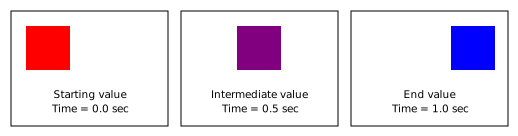
トランジションはプレゼンテーション効果です。プロパティの算出値は、時間の経過とともに古い値から新しい値へと遷移します。そのため、スクリプトでプロパティの算出値(またはそれに依存する他のデータ)をトランジション中に取得すると、その時点でのアニメーション値(途中の値)が返されます。
プロパティのトランジションは複数の新しいプロパティで定義します。例:
div {
  transition-property: opacity;
  transition-duration: 2s;
}
上記の例は、opacity
プロパティにトランジションを定義しており、新しい値が割り当てられると、旧値から新値まで2秒間なめらかに変化します。
各トランジションプロパティはカンマ区切りのリストを受け付け、複数のトランジションを定義できます。それぞれ異なるプロパティに作用し、この場合、各トランジションはすべてのリストの同じインデックスからパラメーターを取得します。例:
div {
  transition-property: opacity, left;
  transition-duration: 2s, 4s;
}
これによりopacity
プロパティは2秒間、leftプロパティは4秒間かけて遷移します。
トランジションプロパティの値リストの長さが一致しない場合、transition-property リストの長さが トランジション開始時に調べる各リストのアイテム数となります。リストは先頭から対応付けされ、余分な値は無視されます。他のプロパティがtransition-propertyの個数分足りない場合、ユーザーエージェントは値を繰り返して十分にします。 これは格納値(computed value)には影響しません。 注: この動作はbackground-*プロパティにおける background-image と transition-property の関係に類似します。
div {
  transition-property: opacity, left, top, width;
  transition-duration: 2s, 1s;
}
上記の例は、opacity
プロパティのトランジションを2秒、leftプロパティのトランジションを1秒、
topプロパティのトランジションを2秒、
そしてwidth
プロパティのトランジションを1秒間で定義します。
作者はトランジションを使って動的に変化するコンテンツを作成できますが、 動的なコンテンツは一部のユーザーに発作を引き起こす可能性があります。 発作を招くおそれのあるコンテンツを避ける方法については、 ガイドライン2.3: 発作: 発作を引き起こすと知られている方法でコンテンツを設計しない([WCAG20])を参照してください。
テスト
- animate-with-color-mix.html (ライブテスト) (ソース)
- color-transition-premultiplied.html (ライブテスト) (ソース)
- text-shadow-composition.html (ライブテスト) (ソース)
- text-shadow-interpolation.html (ライブテスト) (ソース)
- vertical-align-composition.html (ライブテスト) (ソース)
- vertical-align-interpolation.html (ライブテスト) (ソース)
- z-index-interpolation.html (ライブテスト) (ソース)
- idlharness.html (ライブテスト) (ソース)
- inherit-background-color-transition.html (ライブテスト) (ソース)
- inheritance.html (ライブテスト) (ソース)
- properties-value-001.html (ライブテスト) (ソース)
- properties-value-002.html (ライブテスト) (ソース)
- properties-value-003.html (ライブテスト) (ソース)
- properties-value-implicit-001.html (ライブテスト) (ソース)
- retargetted-transition-with-box-sizing.html (ライブテスト) (ソース)
- shadow-root-insertion.html (ライブテスト) (ソース)
- transition-base-response-001.html (ライブテスト) (ソース)
- transition-base-response-002.html (ライブテスト) (ソース)
- transition-base-response-003.html (ライブテスト) (ソース)
- transition-in-iframe-001.html (ライブテスト) (ソース)
2.1. transition-property プロパティ
transition-propertyプロパティは、トランジションが適用されるCSSプロパティ名を指定します。
| 名前: | transition-property |
|---|---|
| 値: | none | <single-transition-property># |
| 初期値: | all |
| 適用対象: | 全要素 |
| 継承: | no |
| パーセンテージ: | N/A |
| 算出値: | キーワードnone または 識別子リスト |
| 正準順序: | 構文ごと |
| アニメーション型: | アニメーション不可 |
テスト
- move-after-transition.html (ライブテスト) (ソース)
- transition-end-event-shorthands.html (ライブテスト) (ソース)
- transition-property-computed.html (ライブテスト) (ソース)
- transition-property-invalid.html (ライブテスト) (ソース)
- transition-property-valid.html (ライブテスト) (ソース)
- pseudo-element-transform.html (ライブテスト) (ソース)
- pseudo-elements-001.html (ライブテスト) (ソース)
- pseudo-elements-002.html (ライブテスト) (ソース)
- transition-background-position-with-edge-offset.html (ライブテスト) (ソース)
- transition-property-001.html (ライブテスト) (ソース)
- transition-property-002.html (ライブテスト) (ソース)
- transition-property-003-manual.html (手動テスト) (ソース)
- transition-property-004-manual.html (手動テスト) (ソース)
- transition-property-005-manual.html (手動テスト) (ソース)
- transition-property-006-manual.html (手動テスト) (ソース)
- transition-property-007-manual.html (手動テスト) (ソース)
- transition-property-008-manual.html (手動テスト) (ソース)
- transition-property-009-manual.html (手動テスト) (ソース)
- transition-property-010-manual.html (手動テスト) (ソース)
- transition-property-011-manual.html (手動テスト) (ソース)
- transition-property-012-manual.html (手動テスト) (ソース)
- transition-property-013-manual.html (手動テスト) (ソース)
- transition-property-014-manual.html (手動テスト) (ソース)
- transition-property-015-manual.html (手動テスト) (ソース)
- transition-property-016-manual.html (手動テスト) (ソース)
- transition-property-017-manual.html (手動テスト) (ソース)
- transition-property-018-manual.html (手動テスト) (ソース)
- transition-property-019-manual.html (手動テスト) (ソース)
- transition-property-020-manual.html (手動テスト) (ソース)
- transition-property-021-manual.html (手動テスト) (ソース)
- transition-property-022-manual.html (手動テスト) (ソース)
- transition-property-023-manual.html (手動テスト) (ソース)
- transition-property-024-manual.html (手動テスト) (ソース)
- transition-property-025-manual.html (手動テスト) (ソース)
- transition-property-026-manual.html (手動テスト) (ソース)
- transition-property-027-manual.html (手動テスト) (ソース)
- transition-property-028-manual.html (手動テスト) (ソース)
- transition-property-029-manual.html (手動テスト) (ソース)
- transition-property-030-manual.html (手動テスト) (ソース)
- transition-property-031-manual.html (手動テスト) (ソース)
- transition-property-032-manual.html (手動テスト) (ソース)
- transition-property-033-manual.html (手動テスト) (ソース)
- transition-property-034-manual.html (手動テスト) (ソース)
- transition-property-035-manual.html (手動テスト) (ソース)
- transition-property-036-manual.html (手動テスト) (ソース)
- transition-property-037-manual.html (手動テスト) (ソース)
- transition-property-038-manual.html (手動テスト) (ソース)
- transition-property-039-manual.html (手動テスト) (ソース)
- transition-property-040-manual.html (手動テスト) (ソース)
- transition-property-041-manual.html (手動テスト) (ソース)
- transition-property-042-manual.html (手動テスト) (ソース)
- transition-property-043-manual.html (手動テスト) (ソース)
- transition-property-044-manual.html (手動テスト) (ソース)
- transition-property-045-manual.html (手動テスト) (ソース)
- transition-test.html (ライブテスト) (ソース)
- transition-zero-duration-with-delay.html (ライブテスト) (ソース)
none の値は、いかなるプロパティもトランジションしないことを意味します。 それ以外の場合は、トランジション対象となるプロパティのリスト、または全プロパティをトランジションすることを示すキーワード all を指定します。
リスト内の識別子のいずれかが認識されないプロパティ名だった場合も、 実装はリスト内のアニメーション可能なプロパティについて、それぞれ transition-duration、 transition-delay、 transition-timing-function のリストの該当インデックスの値でトランジションを開始しなければなりません。 つまり、認識されないプロパティでもインデックス対応を保つためリスト内に維持されます。
<custom-ident> は、キーワード none を除外します。 これは、<custom-ident> で常に除外されるキーワードに加え、 none, inherit, initial も、 識別子リストのアイテムとしては使用できません。これらが使われたリストは構文的に無効です。
all キーワードや ショートハンドプロパティがリストに含まれる場合、 実装はすべてのロングハンド・サブプロパティ(または all なら全プロパティ)のトランジションを、 ショートハンドのインデックスのduration, delay, timing functionで開始しなければなりません。
transition-property の値内でプロパティが複数回指定された場合(単独、ショートハンド、all経由など)、最後に指定されたアイテムのインデックスの duration, delay, timing function でトランジションが開始されます。
注: all 値と all ショートハンドプロパティは同様に機能します。 all値は全プロパティをカバーするショートハンドのようなものです。
2.2. transition-duration プロパティ
transition-duration プロパティは、トランジションの所要時間を定義します。
| 名前: | transition-duration |
|---|---|
| 値: | <time [0s,∞]># |
| 初期値: | 0s |
| 適用対象: | 全要素 |
| 継承: | no |
| パーセンテージ: | N/A |
| 算出値: | リスト(各項目が継続時間) |
| 正準順序: | 構文ごと |
| アニメーション型: | アニメーション不可 |
テスト
- infinite-duration-crash.html (ライブテスト) (ソース)
- transition-duration-computed.html (ライブテスト) (ソース)
- transition-duration-invalid.html (ライブテスト) (ソース)
- transition-duration-valid.html (ライブテスト) (ソース)
- transition-duration-001.html (ライブテスト) (ソース)
- transition-duration-002-manual.html (手動テスト) (ソース)
- transition-duration-003-manual.html (手動テスト) (ソース)
- transition-duration-004-manual.html (手動テスト) (ソース)
- transition-duration-shorthand.html (ライブテスト) (ソース)
このプロパティは、値の遷移が完了するまでにかける時間を指定します。初期値は 0s で、遷移は即時(つまりアニメーションなし)となります。transition-duration に負の値を指定すると、その宣言は無効となります。
2.3. transition-timing-function プロパティ
transition-timing-functionプロパティは、 トランジションの中間値の計算方法を記述します。これによってトランジション中に速度変化(イージング)が可能になります。
タイミング関数は、CSS Easing Functionsモジュール [css-easing-1] で定義されています。 使用される 入力進行値 は遷移の所要時間の割合であり、 出力進行値が 補間時の p として使われます(§ 4 トランジションの適用参照)。
| 名前: | transition-timing-function |
|---|---|
| 値: | <easing-function># |
| 初期値: | ease |
| 適用対象: | 全要素 |
| 継承: | no |
| パーセンテージ: | N/A |
| 算出値: | 指定通り |
| 正準順序: | 構文ごと |
| アニメーション型: | アニメーション不可 |
テスト
- transition-timing-function.html (ライブテスト) (ソース)
- transition-timing-function-computed.html (ライブテスト) (ソース)
- transition-timing-function-invalid.html (ライブテスト) (ソース)
- transition-timing-function-valid.html (ライブテスト) (ソース)
- transition-timing-function-002-manual.html (手動テスト) (ソース)
- transition-timing-function-003-manual.html (手動テスト) (ソース)
- transition-timing-function-004-manual.html (手動テスト) (ソース)
- transition-timing-function-005-manual.html (手動テスト) (ソース)
- transition-timing-function-006-manual.html (手動テスト) (ソース)
- transition-timing-function-010-manual.html (手動テスト) (ソース)
2.4. transition-delay プロパティ
transition-delayプロパティは、トランジションが開始されるタイミングを定義します。このプロパティにより、トランジションは適用されてから一定時間経過後に実行を開始できます。transition-delayの値が0sの場合、プロパティが変更された直後にトランジションが実行されます。それ以外の場合、値はプロパティが変更されてからのオフセットを指定し、トランジションの実行はそのオフセット分遅延します。
transition-delayに負の時間オフセットが指定された場合、プロパティが変更された瞬間にトランジションは実行を開始しますが、指定されたオフセット時点から開始したかのように振る舞います。つまり、トランジションは途中から再生を開始したように見えます。暗黙的な開始値を持ち、transition-delayが負の場合、開始値はプロパティ変更の瞬間のものを使用します。
| 名前: | transition-delay |
|---|---|
| 値: | <time># |
| 初期値: | 0s |
| 適用対象: | 全要素 |
| 継承: | no |
| パーセンテージ: | N/A |
| 算出値: | リスト(各項目が継続時間) |
| 正準順序: | 構文ごと |
| アニメーション型: | アニメーション不可 |
テスト
- transition-delay-computed.html (ライブテスト) (ソース)
- transition-delay-invalid.html (ライブテスト) (ソース)
- transition-delay-valid.html (ライブテスト) (ソース)
- transition-delay-000-manual.html (手動テスト) (ソース)
- transition-delay-001.html (ライブテスト) (ソース)
- transition-delay-002-manual.html (手動テスト) (ソース)
- transition-delay-003-manual.html (手動テスト) (ソース)
2.5. transition ショートハンドプロパティ
transitionショートハンドプロパティは、上記4つのプロパティを1つのプロパティとしてまとめます。
| 名前: | transition |
|---|---|
| 値: | <single-transition># |
| 初期値: | 各プロパティ参照 |
| 適用対象: | 全要素 |
| 継承: | no |
| パーセンテージ: | N/A |
| 算出値: | 各プロパティ参照 |
| アニメーション型: | アニメーション不可 |
| 正準順序: | 構文ごと |
テスト
このプロパティ内では値の順序が重要であり、最初に時間として解釈できる値がtransition-durationに、2番目の時間として解釈できる値がtransition-delayに割り当てられます。
ショートハンド内に複数の<single-transition>があり、そのうちいずれかのトランジションのnoneが<single-transition-property>として指定された場合、その宣言は無効となります。
3. トランジションの開始
Implementations must maintain a set of 実行中のトランジション, each of which applies to a specific element and non-shorthand property. Each of these transitions also has a 開始時刻, 終了時刻, 開始値, 終了値, 反転調整済み開始値, and 反転短縮係数. Transitions are added to this set as described in this section, and are removed from this set when they 完了 or when implementations are required to キャンセル them. For the rationale behind the 反転調整済み開始値 and 反転短縮係数, see § 3.1 中断されたトランジションのより速い反転.
Implementations must also maintain a set of 完了したトランジション, each of which (like 実行中のトランジション) applies to a specific element and non-shorthand property. This specification maintains the invariant that there is never both a 実行中のトランジション and a 完了したトランジション for the same property and element.
If an element is no longer in the document, implementations must キャンセル any 実行中のトランジション on it and remove transitions on it from the 完了したトランジション.
この完了したトランジションの集合は、 あるケースでトランジションが繰り返されるのを防ぐために 維持する必要がある、すなわち本仕様が維持しようとする不変条件、 無関係なスタイル変更がトランジションを引き起こさないということを守るためである。
完了したトランジションの集合の維持が必要となる例は、継承されるプロパティのトランジションで、 親がそのプロパティに対してより長い期間のトランジションを指定している場合(たとえば、transition: 4s text-indent) と、親の値を継承する子要素が同じプロパティについてより短い期間のトランジションを指定する場合(たとえば、transition: 1s text-indent)。 完了したトランジション集合を維持していないと、実装は子要素での最初の1秒のトランジションが完了した後に追加のトランジションを開始してしまう可能性がある。
様々な事柄が、要素上のプロパティの 計算済み値 を変化させる可能性がある。 これらには、 ドキュメントツリーへの要素の挿入および削除(これによりその要素が 計算済み値 を持つかどうかが変わり、 セレクタのマッチングを通じて他の要素のスタイルを変えることがある)、 セレクタのマッチングが変わる原因となるドキュメントツリーの変更、 スタイルシートや style 属性の変更、 その他の事柄が含まれる。 本仕様は 計算済み値 がいつ更新されるかを定義していないが、 実装は CSS のカスケード、値の計算、および継承プロセスに起因する何かを [CSS3CASCADE] に基づいて使用、表示、あるいは提示する際に 計算済み値 を更新せずにそれを行ってはならない(これは単に、実装がスタイル変更を扱う過程で 計算済み値 を更新していないと主張することで本仕様の要件を回避してはならない、という意味である)。 しかしながら、 実装が要素上のプロパティの 計算済み値 をこれらの変更のいずれかを反映するように更新する場合、 またはドキュメントに新たに追加された要素のプロパティの 計算済み値 を計算する場合、 それは全てのプロパティと要素の 計算済み値 を同時に反映するように更新しなければならない (少なくとも異なる時刻に行われたことが検出できないこと)。 この一連の同時のスタイル変更の処理を スタイル変更イベント と呼ぶ。 (実装は通常、画面のリフレッシュ率に対応する スタイル変更イベント を持ち、スクリプト API がそれに依存する最新の計算済みスタイルやレイアウト情報を必要とする場合に使用する。)
本仕様はいつ スタイル変更イベント が発生するかを定義していないため、 どの計算済み値の変更が同時とみなされるかも定義していないことから、 著者は、トランジションに関係する可能性のある変更を行った直後に少しの時間差で transition-* プロパティを変更すると、 実装間で挙動が異なる可能性があることに注意すべきである。というのは、ある実装ではそれらの変更が同時とみなされるが、別の実装ではそうではないかもしれないためである。
When a style change event occurs, implementations must start transitions based on the computed values that changed in that event. If an element is not in the document during that style change event or was not in the document during the previous style change event, then transitions are not started for that element in that style change event. Otherwise, define the before-change style as the computed values of all properties on the element as of the previous style change event, except with any styles derived from declarative animations such as CSS Transitions, CSS Animations ([CSS3-ANIMATIONS]), and SMIL Animations ([SMIL-ANIMATION], [SVG11]) updated to the current time. Likewise, define the after-change style as the computed values of all properties on the element based on the information known at the start of that style change event, but using the computed values of the animation-* properties from the before-change style, excluding any styles from CSS Transitions in the computation, and inheriting from the after-change style of the parent. Note that this means the after-change style does not differ from the before-change style due to newly created or canceled CSS Animations.
テスト
この after-change style の定義は、単一の変更が祖先要素と子孫要素の両方で同じプロパティに対するトランジションを開始できることを意味することに注意する必要がある。 これは、ある要素からのプロパティの変更が、変化するプロパティをアニメートすると指定している transition-* プロパティを持つ要素から別の要素へ継承される場合に発生しうる。
このようなとき、両方のトランジションは実行され、 子孫要素のトランジションが祖先要素のトランジションを上書きする(通常の CSS のカスケードと継承のルールによる)ことになる。
子孫要素のトランジションが祖先のトランジションより先に完了した場合、 子孫要素はその後、(まだトランジション中の)値を親から再び継承するようになる。 この効果は望ましいものではないかもしれないが、本質的には作者が要求した通りの動作をしている。
For each element with a before-change style and an after-change style, and each property (other than shorthands), define the matching transition-property value as the last value in the transition-property in the element’s after-change style that matches the property, as described in § 2.1 The transition-property Property. If there is such a value, then corresponding to it, there is a matching transition duration, a matching transition delay, and a matching transition timing function in the values in the after-change style of transition-duration, transition-delay, and transition-timing-function (see the rules on matching lists). Define the combined duration of the transition as the sum of max(matching transition duration, 0s) and the matching transition delay.
When comparing the before-change style and after-change style for a given property, the property values are transitionable if they have an animation type that is neither not animatable nor discrete.
注: たとえ特定のプロパティが非離散のアニメーションタイプを持つと定義されていても、 特定の一対のプロパティ値についてはそのアニメーションタイプが離散になることがある。 例えば、 box-shadow プロパティのアニメーションタイプは shadow list であり、 その定義では一方の値に inset キーワードが含まれず、もう一方に含まれる場合には離散なアニメーションが使われるとする。 結果として 0px 0px black と inset 10px 10px black は transitionable(トランジション可能)ではない。
For each element and property, the implementation must act as follows:
-
If all of the following are true:
- the element does not have a running transition for the property,
- the before-change style is different from the after-change style for that property, and the values for the property are transitionable,
- the element does not have a completed transition for the property or the end value of the completed transition is different from the after-change style for the property,
- there is a matching transition-property value, and
- the combined duration is greater than 0s,
- start time is the time of the style change event plus the matching transition delay,
- end time is the start time plus the matching transition duration,
- start value is the value of the transitioning property in the before-change style,
- end value is the value of the transitioning property in the after-change style,
- reversing-adjusted start value is the same as the start value, and
- reversing shortening factor is 1.
- Otherwise, if the element has a completed transition for the property and the end value of the completed transition is different from the after-change style for the property, then implementations must remove the completed transition from the set of completed transitions.
- If the element has a running transition or completed transition for the property, and there is not a matching transition-property value, then implementations must cancel the running transition or remove the completed transition from the set of completed transitions.
-
If the element has a running transition for the property,
there is a matching transition-property value,
and the end
value of the running transition is
not equal to the value of the property in the after-change style, then:
- If the current value of the property in the running transition is equal to the value of the property in the after-change style, or if these two values are not transitionable, then implementations must cancel the running transition.
- Otherwise, if the combined duration is less than or equal to 0s, or if the current value of the property in the running transition is not transitionable with the value of the property in the after-change style, then implementations must cancel the running transition.
-
Otherwise, if the reversing-adjusted start value
of the running transition is the same as the value of
the property in the after-change style (see the section on reversing of
transitions for why these case exists),
implementations must cancel the running transition and
start a new transition whose:
- reversing-adjusted start value is the end value of the running transition (注: これはトランジションの論理的な開始状態を表し、トランジションがその状態に到達する前に開始されたことを無視して計算できるようにする。これにより同じトランジションの繰り返し反転が正しく動作するようになる),
-
reversing shortening factor
is the absolute value, clamped to the range [0, 1],
of the sum of:
- the output of the timing function of the old transition at the time of the style change event, times the reversing shortening factor of the old transition
- 1 minus the reversing shortening factor of the old transition.
-
start time is
the time of the style change event plus:
- if the matching transition delay is nonnegative, the matching transition delay, or
- if the matching transition delay is negative, the product of the new transition’s reversing shortening factor and the matching transition delay,
- end time is the start time plus the product of the matching transition duration and the new transition’s reversing shortening factor,
- start value is the current value of the property in the running transition,
- end value is the value of the property in the after-change style,
-
Otherwise, implementations must cancel the running transition and
start a new transition whose:
- start time is the time of the style change event plus the matching transition delay,
- end time is the start time plus the matching transition duration,
- start value is the current value of the property in the running transition,
- end value is the value of the property in the after-change style,
- reversing-adjusted start value is the same as the start value, and
- reversing shortening factor is 1.
注: 上記の規則は、可アニメートなプロパティの計算済み値が変化したときに開始されるトランジションが、 その可アニメートプロパティが最初に新しい計算済み値を持つ時点での transition-property、transition-duration、transition-timing-function、および transition-delay プロパティの値に基づいていることを意味する。 これは、これらの transition-* プロパティのいずれかが、トランジションを引き起こす可能性のあるプロパティの変更と同時に変化した場合、 トランジションに影響するのはそれらの transition-* プロパティの新しい値であることを意味する。
これは、状態間のトランジションにおいて「順方向」と「逆方向」のトランジションのために著者が異なる transition-* の値を指定する方法を提供する(ただし、中断された未完了のトランジションに対する特別な反転挙動については 以下 を参照)。著者は、トランジションを引き起こす値を指定するのと同じルールの中で transition-duration、transition-timing-function、または transition-delay の値を指定することができるし、 トランジションを引き起こすプロパティを変更するときにこれらのプロパティを同時に変更することもできる。これらの transition-* プロパティの新しい値がトランジションに影響するため、これらの値は関連する遷移値へのトランジション(to)に使われる。例えば:
li {
  transition: background-color linear 1s;
  background: blue;
}
li:hover {
  background-color: green;
  transition-duration: 2s; /* applies to the transition *to* the :hover state */
}
これらのスタイルルールを持つリスト項目が :hover 状態に入ると、transition-duration の計算済み値は、その時点で background-color が新しい値(green)を持つ時点で 2s になる、 したがって blue から green へのトランジションは2秒かかる。 しかし、そのリスト項目が :hover 状態を離れると、green から blue へのトランジションは1秒かかる。
注: プロパティのトランジションが一度開始されると(遅延フェーズにある場合も含む)、 トランジションは元のタイミング関数、継続時間、および遅延に基づいて実行され続ける。たとえ transition-timing-function、transition-duration、または transition-delay プロパティがトランジション完了前に変更されたとしてもである。 ただし、transition-property がトランジションが開始されないように変化した場合、トランジションは停止し(そしてプロパティは直ちに最終値に変わる)。
注: 上記の規則は、宣言的アニメーション(スクリプトによるアニメーションではなく)によってプロパティの計算済み値が変わった場合にはトランジションは開始されないことを意味する。 これは before-change style に宣言的アニメーションの最新のスタイルが含まれているためである。
テスト
- before-load-001.html (ライブテスト) (ソース)
- changing-while-transition-001.html (ライブテスト) (ソース)
- changing-while-transition-002.html (ライブテスト) (ソース)
- changing-while-transition-003.html (ライブテスト) (ソース)
- changing-while-transition-004.html (ライブテスト) (ソース)
- currentcolor-animation-001.html (ライブテスト) (ソース)
- disconnected-element-001.html (ライブテスト) (ソース)
- dynamic-root-element.html (ライブテスト) (ソース)
- historical.html (ライブテスト) (ソース)
- inherit-height-transition.html (ライブテスト) (ソース)
- non-rendered-element-001.html (ライブテスト) (ソース)
- non-rendered-element-002.html (ライブテスト) (ソース)
- properties-value-inherit-001.html (ライブテスト) (ソース)
- properties-value-inherit-002.html (ライブテスト) (ソース)
- properties-value-inherit-003.html (ライブテスト) (ソース)
- starting-of-transitions-001.html (ライブテスト) (ソース)
- root-color-transition.html (ライブテスト) (ソース)
- transition-after-animation-001.html (ライブテスト) (ソース)
- transition-remove-and-change-immediate.html (ライブテスト) (ソース)
- transition-reparented.html (ライブテスト) (ソース)
- transitions-retarget.html (ライブテスト) (ソース)
- zero-duration-multiple-transition.html (ライブテスト) (ソース)
3.1. 中断されたトランジションの高速反転
よくあるトランジション効果は2つの状態間のトランジションであり、たとえばユーザーインターフェース要素にマウスポインターが乗り、その後外れるときの遷移などです。 こうした効果では、トランジション実行中に完了前に中断され、プロパティがそのトランジションの開始値にリセットされることが多くあります。 例としては、要素へのホバー効果があり、ポインターが要素に入ったときにトランジションが始まり、効果が完了する前にポインターが要素から出た場合などです。 もし出入り両方のトランジションが指定された継続時間とタイミング関数で実行されると、2回目のトランジションが短い距離を設定された全時間かけて行われるため、視覚的にアンバランスな印象になります。 この仕様では2回目のトランジションをより短くします。
上記規則が利用する仕組みは逆転短縮係数と逆転調整開始値です。 特に、逆転動作は逆転短縮係数が1未満の時に発生します。
注: これらの規則は2状態以上を含むトランジションパターンには完全には対応しません。
注: これらの規則は新しいトランジションのタイミング関数全体が用いられ、「途中から」タイミング関数にジャンプしないため、唐突な効果を避けます。
これはワーキンググループで検討された案の1つです。いくつかの案を含むリバーシングデモも参照。最終案は2013-06-07のWG決議と2013-11-11の編集で決定。
4. トランジションの適用
要素のプロパティがトランジション中である場合(つまり、開始された後から終了時刻までの間)、 トランジションは「現値」と呼ばれるスタイルをCSSカスケードに、[CSS3CASCADE]で定義されるレベルで付加します。
注: これは、CSSトランジションによる算出値も他の算出値同様に子孫要素へ継承されうることを意味します。 通常の場合、継承プロパティのトランジションは子孫要素にも期待通り適用されます。
実装は、同じ要素でそのプロパティがCSS Animation([CSS3-ANIMATIONS])中で「ない」場合にかぎり、この値をカスケードに追加しなければなりません。
注: 同じ要素・プロパティでアニメーション中の場合にトランジションをカスケードに適用しなくとも、それがトランジションの開始/終了には影響しません。 トランジションの状態を報告するAPI(transition events など)は、やはりトランジション中であると報告します。
現在時刻がトランジションの開始時刻と同じかそれ以前(=遅延フェーズ中)なら、現値はトランジションの開始値になるように計算されるスタイルとなります。
現在時刻がトランジションの開始時刻より後(=遷移フェーズ中)なら、現値は以下の値で補間した結果になるように計算されるスタイルとなります。
具体的な補間手順は、そのプロパティのアニメーション型で定義されます。
5. トランジションの完了
稼働中トランジションは 完了するのは、終了時刻以上かつそれ以降最初のスタイル変更イベントより前の時刻です。 トランジションが完了した際、実装は その時に完了したすべてのトランジションを 稼働中トランジションから 完了済みトランジションのセットへ移動し、 その完了イベントを発火しなければなりません。(注:そうしない場合、つまりイベント発火前に「稼働中→完了済み」への一括移動をしなければ、 イベントハンドラでスタイル変更イベントが生じてしまうと、必要なトランジションが完了せずにスタイル変更イベントが発生する場合があり得ます。)
6. トランジションイベント
CSSトランジションの生成・開始・完了・キャンセル時に、それぞれ対応するDOMイベントを発生させます。 各プロパティごとに、その要素上のトランジションに対応するイベントがディスパッチされます。 これによりコンテンツ制作者がトランジションと同期した動作を行えます。
各イベントは、関連するCSSプロパティ名とトランジションの継続時間も提供します。
6.1.
インタフェース TransitionEvent
TransitionEvent
インタフェースはトランジション関連の文脈情報を提供します。
6.1.1. IDL定義
[Exposed =Window ]interface :TransitionEvent Event {constructor (CSSOMString ,type optional TransitionEventInit = {});transitionEventInitDict readonly attribute CSSOMString propertyName ;readonly attribute double elapsedTime ;readonly attribute CSSOMString pseudoElement ; };dictionary :TransitionEventInit EventInit {CSSOMString = "";propertyName double = 0.0;elapsedTime CSSOMString = ""; };pseudoElement
6.1.2. 属性
propertyName, 型 CSSOMString, readonly-
トランジションに関連付けられたCSSプロパティの名前。
注: これは常にロングハンドプロパティ名です。ショートハンド指定時の挙動は transition-property を参照。
elapsedTime, 型 double, readonly-
このイベント発火時点で、トランジションが(ディレイ中を除外し)何秒実行されていたか。 このメンバーの計算方法は各イベントタイプの説明で定義されています。
pseudoElement, 型 CSSOMString, readonly-
トランジション発生のCSS疑似要素(“::”で始まる名前)。その場合イベントのターゲットもその疑似要素の対応実体となります。 要素自身で発生した場合は空文字列(ターゲットはその要素)。
TransitionEvent(type, transitionEventInitDict)
6.2. TransitionEventの種類
発生しうるトランジションイベントの種類:
transitionrun-
transitionrunイベントは、トランジションが生成された(稼働中トランジションに追加された)際に発生します。transition-delayが負だと、イベントでは
elapsedTimeは遅延の絶対値とアニメーションのtransition-durationのうち小さい方(0以上)です。- バブル: あり
- キャンセル: 不可
- 文脈情報: propertyName, elapsedTime, pseudoElement
transitionstart-
transitionstartイベントはトランジション遅延フェーズ終了時に発生します。elapsedTimeの値はtransitionrunと同じです。- バブル: あり
- キャンセル: 不可
- 文脈情報: propertyName, elapsedTime, pseudoElement
transitionend-
transitionendイベントはトランジション完了時に発生します。トランジションが完了前に除去(たとえばtransition-propertyが除去)されるとイベントは発火しません。elapsedTimeはtransition-durationの値です。- バブル: あり
- キャンセル: 不可
- 文脈情報: propertyName, elapsedTime, pseudoElement
transitioncancel-
transitioncancelイベントはトランジションがキャンセルされた際に発生します。elapsedTimeは、遅延終了からキャンセルまでの秒数です。 負のtransition-delayの場合、 トランジション開始は「実際のトリガより前へ絶対値(秒)さかのぼった」時扱いとなります。 正のtransition-delayで遅延中にイベントが発火した場合、elapsedTimeは0となります。- バブル: あり
- キャンセル: 不可
- 文脈情報: propertyName, elapsedTime, pseudoElement
6.3. 要素・Document・Windowオブジェクト上のイベントハンドラ
以下は、すべてのHTML要素がイベントハンドラ内容属性およびイベントハンドラIDL属性としてサポートし、
Document
および Window
もイベントハンドラIDL属性としてサポートする必要があるイベントハンドラ(およびそれに対応するイベントタイプ):
| イベントハンドラ | イベントハンドライベントタイプ |
|---|---|
ontransitionrun
| transitionrun |
ontransitionstart
| transitionstart |
ontransitionend
| transitionend |
ontransitioncancel
| transitioncancel |
7. DOMインタフェース
この仕様では、HTMLのGlobalEventHandlers
インタフェースミックスインを拡張し、イベントハンドラIDL属性としてトランジションイベント用を追加します(§6.3参照)。
7.1. IDL定義
partial interface mixin GlobalEventHandlers {attribute EventHandler ;ontransitionrun attribute EventHandler ;ontransitionstart attribute EventHandler ;ontransitionend attribute EventHandler ; };ontransitioncancel
8. セキュリティに関する考慮事項
このセクションは規範的ではありません。
この仕様のセキュリティへの影響は限定的です。なぜならWebコンテンツがこれまでできなかったことを可能にするわけではなく むしろスクリプトで実現できていたことを宣言的な形で、かつ実装が(CPUやフレームレートに最適化できる)方法でできるようにするだけです。
実装が得られる主な最適化手法のひとつは、transformやopacityなど特定の重要プロパティのアニメーションを、 ウェブコンテンツのメインスレッドでスタイルやレイアウトの再計算を走らせず、ブラウザのコンポジタースレッド/プロセス上で実行することです(必要な場合のみ最新スタイル情報を取得して反映)。 この最適化には、アニメーション要素の内容の描画用グラフィックメモリ割り当ても頻繁に必要となります。 実装は、多数のアニメーションや巨大な領域(事前または変形後いずれか)をカバーするアニメーションによって 危険なメモリ不足動作をユーザーが誘発できないよう注意すべきです。
9. プライバシーに関する考慮事項
このセクションは規範的ではありません。
セキュリティと同様、この仕様によるプライバシーへの新たな懸念も基本的にありません。
ただし本仕様は、ユーザーのハードウェアやソフトウェア特性を推測する新たな手段を与える場合もあり得ます。 しかしユーザー環境の性能推定自体は多くのWeb技術に共通であり、 本仕様が新たな手段を導入するということはありません。
§10 アクセシビリティの考慮事項で述べたように、 実装は支援機能を有効化したユーザー向けの緩和策を提供する場合があります。 これらの措置はWebコンテンツ側でも検出できる可能性があり、 利用者が緩和策による利益と 障害をWebコンテンツに知られるリスクの間で相反を迫られることもありえます。
10. アクセシビリティに関する考慮事項
このセクションは規範的ではありません。
10.1. 動き
この仕様は、従来スクリプトで指定していたアニメーションに対し宣言的な仕組みを提供します。 宣言的手段にすることで、アニメーションを制作しやすくなり、その結果一般的になりやすくなりますが、 同時にユーザーエージェントが必要に応じてこうしたアニメーションをユーザーのアクセシビリティニーズに合わせて調整しやすくなります。
そのため、動きに敏感なユーザーや、内容の理解や読解に時間がかかるユーザーの場合は アニメーションの無効化や減速を可能にするUA機能によるメリットが得られます。 (ただしこのような緩和策でプライバシーへの影響については§9を参照)
UA実装者は、Webコンテンツがトランジションイベントの発火に依存している場合があることに留意すべきであり、 たとえトランジションが連続アニメーションとして実行されなくても、イベントは発火した方がよいこともあります。 ただし、そうしたイベント依存のWebコンテンツは正しい実装(ベストプラクティス)ではありません。
10.2. カスケード
CSSのカスケード機構は、ユーザーニーズと著者スタイルとの相互作用を可能にします。 本仕様はカスケードと連携しますが、 既存カスケード規則結果間のみでアニメーションするため、 ユーザーがプロパティ値の強制指定を妨げません。
カスケード機構により、transition系プロパティを上書きすればトランジション全体を無効化することも可能です。
11. 変更点
11.1. 2018年10月11日作業草案からの変更点
次は、2018年10月11日付 作業草案以降に加えられた実質的な変更点です:
-
GlobalEventHandlersがミックスインであることを明確化。 -
廃止された
<timing-function>を <easing-function> に置き換え。 -
transitionEventInitDict辞書にデフォルト値を追加。 -
<single-transition-property> 構文から末尾のセミコロンを削除。
-
イベント定義を
GlobalEventHandlersコンテナに関連付け。 -
プロパティ値への範囲記法を追加。
-
Web Platform Tests のカバレッジを追加。
-
編集上の細かな修正・改善。
これらの変更の詳細は、バージョン管理の変更ログを参照してください。
11.2. それ以前の変更点
これ以前の作業草案での変更:
-
これらの変更について詳細は、ファイル名変更のため複数に分かれたバージョン管理の変更ログを参照:
12. 謝辞
特にフィードバックをくださった Tab Atkins、 Carine Bournez、 Aryeh Gregor、 Vincent Hardy、 Anne van Kesteren、 Cameron McCormack、 Alex Mogilevsky、 Jasper St. Pierre、 Estelle Weyl、 そしてwww-styleコミュニティの全ての方々に感謝します。
テスト
この仕様の後続レベルに関するテスト
- allow-discrete-auto-inset.html (ライブテスト) (ソース)
- custom-property-and-allow-discrete.html (ライブテスト) (ソース)
- display-none-no-animations.html (ライブテスト) (ソース)
- idlharness-2.html (ライブテスト) (ソース)
- inert-while-transitioning-to-display-none.html (ライブテスト) (ソース)
- starting-style-parsing.html (ライブテスト) (ソース)
- transition-behavior.html (ライブテスト) (ソース)
- starting-style-adjustment.html (ライブテスト) (ソース)
- starting-style-cascade.html (ライブテスト) (ソース)
- starting-style-first-letter-crash.html (ライブテスト) (ソース)
- starting-style-name-defining-rules.html (ライブテスト) (ソース)
- starting-style-rule-basic.html (ライブテスト) (ソース)
- starting-style-rule-none.html (ライブテスト) (ソース)
- starting-style-rule-pseudo-elements.html (ライブテスト) (ソース)
- starting-style-size-container.html (ライブテスト) (ソース)
- transition-behavior.html (ライブテスト) (ソース)
- transition-behavior-events.html (ライブテスト) (ソース)