EditContext API

W3C 作業草案

この文書の詳細情報
このバージョン:
https://www.w3.org/TR/2025/WD-edit-context-20251112/
最新の公開バージョン:
https://www.w3.org/TR/edit-context/
最新の編集者ドラフト:
https://w3c.github.io/edit-context/
履歴:
https://www.w3.org/standards/history/edit-context/
コミット履歴
編集者:
(Microsoft)
以前の編集者:
(Microsoft) - まで
(Microsoft) - まで
(Microsoft) - まで
フィードバック:
GitHub w3c/edit-context (プルリクエスト, 新しい issue, オープンされている issue)
public-editing-tf@w3.org 件名 [edit-context] … メッセージ トピック … (アーカイブ)
参加方法
GitHub に参加できます。
バグを報告。
コミット履歴。
メーリングリスト。

概要

EditContext は、著者がテキスト入力プロセスにより直接参加できるようにする API です。

この文書のステータス

このセクションは、公開時点での 文書のステータスについて説明します。現在の W3C 公開文書一覧およびこの技術レポートの最新改訂は、 W3C 標準および草案一覧 にあります。

この文書は Web 編集ワーキンググループ により、 勧告トラック を使用して 作業草案として公開されました。

作業草案としての公開は、W3C およびその会員による承認を 意味するものではありません。

この文書は草案です。今後、更新、差し替え、または廃止される可能性があります。 進行中の作業以外として引用するのは不適切です。

この文書は、W3C 特許ポリシー のもとで活動する グループによって作成されています。 W3C は、 グループの成果物に関連して公開された 特許開示リスト を維持しています。 そのページには特許開示の方法も記載されています。ある人物が必須クレームを 含む特許を知っている場合、その情報は 特許ポリシー第6節に 従って開示する必要があります。

この文書は 2025年8月18日 W3C プロセス文書 に よって管理されています。

1. はじめに

1.1 背景と動機

このセクションは規定ではありません。

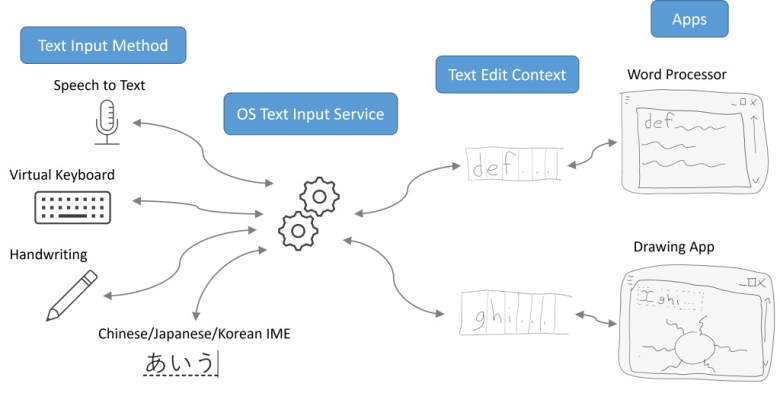
最新のオペレーティングシステムは、音声入力、ソフトウェアキーボード、手書き認識など、さまざまな方法でテキストを生成する仕組みを提供している。アプリがこれらさまざまなソースからのテキスト入力を受け取りたい場合、まず現在編集可能なテキストのビューを OS に提供する必要がある。編集可能テキストのビューは、(さまざまな文書モデルを持つ)アプリと(さまざまな入力手段を持つ)テキストソースの双方が理解できる共通言語を提供する。アプリと入力ソースの両方は、この共通ビューの状態に対する望ましい変更を、相手が処理可能なイベントとして表現することで、テキスト入力プロセスを成り立たせる。

本書においては、テキストの生成側を Text Input Method(テキスト入力メソッド)と呼ぶ。テキストを消費したいアプリが提供するビューは Text Edit Context(テキスト編集コンテキスト)と呼ぶ。Text Edit Context 内のテキスト編集を、Text Input Methods(テキスト入力メソッド)によって円滑に行えるようにする OS のサービスは、Text Input Service(テキスト入力サービス)と呼ぶ。

Figure 1 多くのText Input MethodsText Input Service を介して、各アプリケーションの Text Edit Contexts と通信している様子。

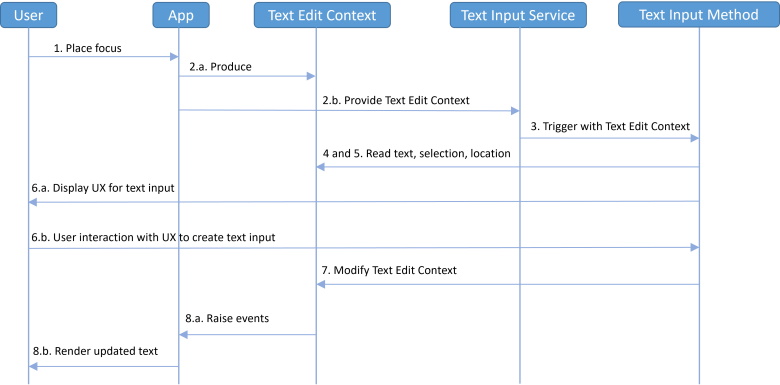
以下に、テキスト入力プロセスの典型的なフローをより詳しく示す:

  1. ユーザーがアプリの編集可能な領域にフォーカスを置く。
  2. アプリは、Text Input Service(テキスト入力サービス)が定める標準に従って、自身の編集可能領域を記述する Text Edit Context を生成し、その Text Edit ContextText Input Service に提供する。
  3. Text Input Service は、ユーザーからテキスト入力を取得するためのユーザーインターフェイスを提供するよう、ある Text Input Method を起動し、アプリが生成した Text Input MethodText Edit Context を渡す。
  4. Text Input Method は、ユーザー体験を最適化するために、Text Edit Context から選択位置およびその近傍のテキストを読み取る。
  5. Text Input Method は、選択位置や編集可能領域のスクリーン座標を読み取ることもあり、その情報を用いて、編集中のテキストの近くに自らのユーザーインターフェイスを適切に配置する。
  6. ユーザーは Text Input Method のユーザーインターフェイスを操作し、Text Input Method 固有の方法でテキストを入力する。
  7. Text Input Method は、ユーザー入力に応じて Text Edit Context のテキストと選択に対する望ましい変更を記述する。
  8. アプリは、自身の Text Edit Context への望ましい変更を記述したイベントを処理し、その結果をユーザーへレンダリングする。
Figure 2 典型的なテキスト入力フローを示すシーケンス図。

既存のユーザーエージェントは、このテキスト入力プロセスの詳細を処理することで、文書のどの要素が編集可能領域を表すかを宣言するところまでを著者の責任範囲としている。著者は、input 要素、textarea 要素、contenteditable 要素を使用するか、または designMode 属性を "on" に設定して文書全体を編集可能としてマークすることで、どの領域が編集可能かを表明する。

文書内の編集可能領域にフォーカスが当てられると、ユーザーエージェントは、その編集可能領域の内容とその中の選択位置から Text Edit Context を自動的に生成する。Text Input Method がテキストを生成すると、ユーザーエージェントは、その Text Edit Context に対するイベントを、一連の DOM およびスタイルの変更に変換する。これらのうち、著者が既存のイベントで扱えるのは一部にすぎない。

高度な編集体験を提供したい著者にとって、現在のアプローチは課題となりうる。たとえば、テキストと選択範囲がキャンバスにレンダリングされている場合、ユーザーエージェントはテキスト入力プロセスを駆動するための Text Edit Context を生成できない。著者はこれを補うためにオフスクリーンの編集可能要素に頼ることになるが、この方法にはアクセシビリティ上の悪影響があり、入力体験を損ない、さらにキャンバス内のテキストとオフスクリーン編集要素内のテキスト位置を同期させる複雑なコードが必要になる。

この EditContext API を導入することで、著者はテキスト入力のプロトコルにより直接参加できるようになり、上述した問題を回避できる。

1.2 EditContext モデル

Text Input Service(テキスト入力サービス)と Text Edit Context(テキスト編集コンテキスト)は、多くのオペレーティングシステムに共通するテキスト入力の側面を表現する抽象化である。 EditContext は、Text Edit Context の JavaScript による表現である。 Text Edit ContextText Input Service による変更が加えられると、その変更はイベントという形で非同期に著者へと通知され、それらのイベントは active EditContext に対してディスパッチされる。 著者が active EditContext に変更を加えると、その変更は次のライフサイクル更新時に Text Edit Context に反映される。

1.2.1 EditContext の状態

Text Edit ContextEditContext はどちらも、前述の更新でやり取りされる情報を保持する text state(テキスト状態)を持つ。text state は次の要素から構成される:

  • text は、編集可能な内容を表す DOMString である。初期値は空文字列である。
  • selection start は、選択範囲の開始位置を表す、text 内のオフセットである。初期値は 0 である。
  • selection end は、選択範囲の終了位置を表す、text 内のオフセットである。初期値は 0 である。selection end は、「後方」選択(文書順とは逆向きの選択)の場合には selection start より小さくなることもある。
  • is composing は、アクティブな合成が存在するかどうかを示す。初期値は false である。
  • composition start は、現在アクティブに合成されているテキストの開始位置を表す、text 内のオフセットである。初期値は 0 である。
  • composition end は、現在アクティブに合成されているテキストの終了位置を表す、text 内のオフセットである。初期値は 0 であり、composition end は常に composition start 以上でなければならない。
  • text formats は、text format の配列である。配列の初期値は空である。
  • control bounds は、DOMRect であり、text が表示されるビューポート領域を表す。これは client coordinate system(クライアント座標系)における値であり、初期の x, y, width, height はすべて 0 である。
  • selection bounds は、選択位置を表す DOMRect である。これは client coordinate system における値であり、初期の x, y, width, height はすべて 0 である。
  • codepoint rects start index は、text 内のオフセットであり、codepoint rects 配列の最初の要素が報告する最初のコードポイントの直前の位置を表す。
  • codepoint rects は、各コードポイントのバウンディングボックスを定義する DOMRect の配列である。配列の初期値は空である。

text format は、text の特定範囲に適用される装飾プロパティを示す構造体である。この構造体は次の要素を含む:

  • range start は、装飾の適用を開始すべき最初のコードポイントの直前の位置を表す、text 内のオフセットである。
  • range end は、装飾の適用を終了すべき最後のコードポイントの直後の位置を表す、text 内のオフセットである。
  • underline style は、装飾対象の text 範囲に対して希望される下線スタイルを表す UnderlineStyle である。
  • underline thickness は、装飾対象の text 範囲に対して希望される下線の太さを表す UnderlineThickness である。
Note

Codepoint rects は、ユーザーエージェントがテキストのある範囲に対して位置情報を問い合わせるための手段を提供する。Text Input Service は、この情報を control bounds および selection bounds と組み合わせて用い、Text Input Method が自らのユーザーインターフェイスを適切に表示できるよう支援する。たとえば、この情報は、合成中のテキストの隣に IME ウィンドウを配置するために利用できる。 プラットフォームによっては、Text Input Service からの問い合わせに応えるために、異なる位置情報をキャッシュしておく必要がある場合がある。ユーザーエージェントは、CharacterBoundsUpdateEvent を発火することで、どの位置情報が必要かを示す。

Control boundsselection bounds、および codepoint rects は、client coordinate system(クライアント座標系)で与えられる。これは、原点をレイアウトビューポートの左上とし、 x 軸をレイアウトビューポートの右方向、 y 軸をレイアウトビューポートの下方向とする 2 次元直交座標系 (x, y) と定義される。 クライアント座標系の単位は CSS pixels である。

Note

EditContext の境界は client coordinates(クライアント座標)で定義されるため、ページ上のあるコンテンツに対応する座標は、そのコンテンツ自体が文書内で移動していなくても、ユーザーが文書をスクロールすると変化する。著者がこれを考慮したくなるシナリオの一例として、ユーザーがアクティブな合成中にページをスクロールする場合が挙げられる。もし著者が(たとえばスクロールイベントリスナー内で)EditContext の境界情報を更新しなければ、IME ウィンドウは合成中のテキストと位置がずれたまま、合成が続く間表示される可能性がある。

しかし、プラットフォームによっては、アクティブな合成中に IME ウィンドウの位置調整を行わないものもあるため、合成の途中で境界情報を更新しても、IME ウィンドウが再配置されるのは、それが閉じられて再度開かれた後になる場合がある。

1.2.2 関連付けと有効化

EditContext は、associated element(関連付けられた要素)として HTMLElement を 1 つ持つ。要素がある EditContextassociated element になるのは、その要素の editContext プロパティにその EditContext を代入したときである。 HTMLElement は、高々 1 つの EditContext とだけ 関連付け ることができる。

Note

EditContext は、自身の associated element を生存させ続ける。そのため、開発者は、ある要素の EditContext をその要素の editContext プロパティに代入すると、そのプロパティがクリアされるか、その EditContext 自体がガーベジコレクションされるまで、その要素はガーベジコレクションされないことに注意すべきである。

ある EditContextassociated elementeditable ではなく、 かつ Document ではない場合で、その designMode 属性が "on" でもないとき、 その associated elementEditContext editing host(EditContext 編集ホスト)となる。 EditContext editing host は、editing host の一種であり、その振る舞いは 1.2.3 Differences for an EditContext editing host に記述される。

Note

これにはいくつかの含意がある。まず、すでに editing host となっている要素(たとえば contenteditable によって編集ホストとなっている要素)が、ある EditContextassociated element となった場合、その要素は EditContext editing host になる、という点である。言い換えると、ある要素に対して EditContextcontenteditable の両方が設定されている場合、EditContext の振る舞いが優先される、ということである。

次に、ある要素が editable であっても editing host ではない場合(すなわち、ある editing host のサブツリー内の子要素である場合)、その要素がある EditContextassociated element になっても、その要素には何の影響もない、という点である。これは、 contenteditable の挙動に類似しており、すでに editable ではあるが editing host ではない要素に対して contenteditable を "true" に設定しても何も起こらないのと同じである。まとめると、これらのルールは、編集可能なノードの木は、EditContext ベースの挙動、または非 EditContext ベースの挙動のいずれか一方にのみ従い、両者を混在させることはできないことを意味する。

Document は、null であることもある active EditContext(アクティブな EditContext)を持つ。

Issue 1

次の段落は、動作変更が [input-events] に反映されたら削除できる。

EditContext editing hostText Input Service からテキスト入力を受け取った場合、その入力によって発火した beforeinput イベントの既定の動作として、ユーザーエージェントは、その EditContext editing host を引数に、Handle Input for EditContext を実行しなければならない。

1.2.3 EditContext 編集ホストにおける差異

多くの点で、EditContext editing host は、たとえば contenteditable 要素に対するもののような、他の種類の editing host と同様に振る舞う。主な類似点としては次のようなものがある:

一方で、EditContext editing host は、他の種類の editing hosts と異なる点もいくつか存在する:

  • 編集対象の Documentactive EditContext が存在する場合、ユーザーエージェントは、EditContext editing host 内でのユーザー操作(編集可能領域でのキーボード入力、テキストの削除や書式変更など)の直接の結果として DOM を更新してはならない。
  • 編集対象の Documentactive EditContext が存在する場合、ユーザーエージェントは、[uievents] に規定されるようなユーザー操作イベントの直接の結果として、EditContext editing host に対して input イベントを発火してはならない。
  • 編集対象の Documentactive EditContext が存在する場合、ユーザーエージェントは、ユーザー操作の直接の結果として、EditContext editing host に対して composition events を発火してはならない。その代わり、それらは EditContext に対して、updating the EditContext(EditContext の更新)または deactivating the EditContext(EditContext の非アクティブ化)の一部として発火される。
  • active EditContextassociated elementcanvas である場合、さらなる差異が存在する:

    • ユーザーエージェントは、canvas 内でテキストがどのようにレイアウトされているかの情報を持たないため、キャレットナビゲーションや選択を処理できず、その実装は著者側の責任となる。
    • 同様に、ユーザーエージェントは、canvas 内でテキストがどのようにレイアウトされているかの情報を持たないため、インラインのスペル・文法候補を表示できない。そのため、著者がスペル・文法候補をサポートしたい場合には、自身でそれを実装する必要がある。

1.2.4 EditContext のイベント

ユーザーエージェントはいくつかの種類のイベントを EditContext に対して発火し、Text Input Service からの変更に応じて DOM の状態を更新すべきタイミングや、Text Input Service からの問い合わせに応答すべきタイミングを著者に知らせる。 Text Input Service のタイミングはプラットフォーム固有であるため、著者はこれらのイベントのタイミングに依存することは避けるべきである。
  • Text Input Service が、ユーザーによってテキスト、選択範囲、または合成範囲プロパティに変更が加えられたことを示した場合、ユーザーエージェントは TextUpdateEvent を発火しなければならない。著者はこのイベントを受け取ったら、ユーザーが入力している内容が視覚的に分かるように、その変更をページのビューに反映しなければならない。
  • Text Input Service が、合成中のテキストに特定の書式を適用すべきであると示した場合、ユーザーエージェントは TextFormatUpdateEvent を発火しなければならない。著者はこのイベントを受け取ったら、IME 合成を支援するために、その書式変更をページのビューに反映しなければならない。

    Note

    指紋採取のリスクを軽減するために、ユーザーエージェントは TextFormatUpdateEvent をディスパッチする前に、UnderlineStyleUnderlineThickness を調整してもよい。これは、特徴的なスタイル特性を持つ入力メソッドが使用されている場合に特に重要となりうる。

  • Text Input Service が、そのユーザーインターフェイスを適切に表示するために文字境界情報を必要としていることを示した場合、ユーザーエージェントは CharacterBoundsUpdateEvent を発火しなければならない。 著者は CharacterBoundsUpdateEvent を受け取ったら、要求された文字境界を計算し、その情報を EditContext の text state 内の文字境界として更新するために updateCharacterBounds を呼び出さなければならない。 著者は可能であれば、CharacterBoundsUpdateEvent のイベントハンドラ内で同期的に updateCharacterBounds を呼び出すべきである。もしそれが不可能であれば、非同期的に呼び出してもよい。 ユーザーエージェントは、updateCharacterBounds を受け取ったら、その文字境界情報を Text Input Service に渡さなければならない。

    Note

    著者が updateCharacterBounds の呼び出しを遅らせれば遅らせるほど、合成の途中で IME ウィンドウが再配置される際に、ユーザーが視覚的なカクつきを目にする可能性は高くなる。

1.2.5 イベントループの変更

新たなステップが、HTML のイベントループ処理モデルにおける Update the rendering(レンダリングの更新)ステップのサブステップとして導入される。このステップは、Documentfocused area がフォーカス不可能になった Document に対するフォーカシングステップを実行する 15 番目のステップの直後に挿入される。 その内容は次のとおりである:各 fully activeDocument doc について、docrelevant global object に対し、DOM manipulation task source 上で queue a global task を行い、 doc を引数として Update the Text Edit Context(Text Edit Context の更新)手順を実行する。

1.2.6

このセクションは規定ではありません。

EditContext を使用すると、著者は、以下の例に示すように、ある要素に associating(関連付け) られた EditContext オブジェクトを通じて、文書の一部分を編集可能領域としてマークできる:

次の例では、著者はキャンバスを使って編集可能領域を描画し、等幅フォントでレンダリングされた 1 行のテキストの入力をユーザーに許可している。編集可能領域のテキストは、著者によって String として管理される。編集可能領域内の選択のテキストオフセットは、selectionStart と selectionEnd という数値のペアとして著者によって管理される。これらの数値は、それぞれ選択開始位置と終了位置より左側にある UTF-16 コードポイントの数を表す。文書内の編集可能領域および現在の選択に対するバウンディング矩形を Text Input Services に伝えるために、著者は CSS ピクセル単位で選択と編集可能領域のバウンディング矩形も計算する。矩形のオフセットは、著者が EditContext を associated している要素である canvas 要素の原点を基準に表現される。著者側のテキストおよび選択位置の表現モデルは、EditContext API が期待する形式と一致しているため、著者はそれらのプロパティが変化するたびに、それらの値をキャンバスに関連付けられた EditContext に単純に代入するだけでよい。

前の例を基にして、ユーザー入力に応じて、著者は編集可能要素(この場合は canvas)と EditContext の両方のイベントを処理すべきである。

DOM に対する input イベントは引き続きユーザーの意図を表現する。

次の例では、TextUpdateEventTextFormatUpdateEvent、および CharacterBoundsUpdateEvent を処理してモデルを更新し、その結果をキャンバスにレンダリングする方法を示す。

1.3 他の編集プリミティブとの相互作用

このセクションは規定ではありません。

著者は必ずしも EditContext とともに canvas 要素を使用しなければならないわけではない。次の例では、著者は div を用いて文書の編集可能領域を確立し、その中にさまざまなスタイル付き要素、画像、テキストなどを使ってコンテンツをレンダリングしている。これにより著者は、選択やスペルチェックといったユーザーエージェントの他の組み込み編集プリミティブを活用できるようになる。

2. 適合性

規定ではないと示されたセクションに加え、本仕様におけるすべての作成ガイドライン、図、例、および注記は規定ではない。それ以外の本仕様のすべては規定である。

本仕様は、単一の製品に適用される適合性基準を定義する:すなわち、本仕様に含まれるインターフェースを実装するユーザーエージェントである。

アルゴリズムまたは特定の手順として表現された適合性要件は、最終結果が同等である限り、どのような方法で実装してもよい。(特に、本仕様で定義されるアルゴリズムは追いやすいことを意図しており、高性能であることを意図していない。)

3. EditContext API

3.1 HTMLElement インターフェースの拡張

WebIDLpartial interface HTMLElement {
     attribute EditContext? editContext;
};

HTMLElement は、内部スロット [[EditContext]] を持つ。これは EditContext への参照であり、初期値は null である。

editContext
editContext の getter 手順は、this の内部 [[EditContext]] スロットの値を返すことである。
editContext の setter は、次の手順に従わなければならない:
Input
editContext
Output
None
  1. thislocal name が、valid shadow host name でも "canvas" でもない場合、"NotSupportedError" DOMExceptionthrow する。
  2. editContext が null でない場合:
    1. editContextassociated elementthis と等しいなら、これらの手順を終了する。
    2. editContextassociated element が null でない場合、"NotSupportedError" DOMExceptionthrow する。
  3. oldEditContext を、this の内部 [[EditContext]] スロットの値とする。
  4. oldEditContext が null でなく、かつ oldEditContextthisnode documentactive EditContext である場合:
    1. oldEditContext を引数に、deactivate an EditContext の手順を実行する。
    2. oldEditContextassociated elementthis と等しくないなら、これらの手順を終了する。
    3. editContext が null でなく、かつ editContextassociated element が null でなく、かつ editContextassociated elementthis と等しくない場合、"NotSupportedError" DOMExceptionthrow する。
  5. oldEditContext が null でない場合、oldEditContextassociated element を null に設定する。
  6. editContext が null でない場合、editContextassociated elementthis に設定する。
  7. this の内部 [[EditContext]] スロットを editContext に設定する。

3.1.1 EditContext に対する入力の処理

Input
element, 入力を受け取る HTMLElement
Output
None
  1. editContext を、elementnode documentactive EditContext とする。
  2. editContext が null の場合、return。
  3. editContextText Edit Contexttext statetexttext formatsselection startselection endis composingcomposition start、 および composition end を与えて、Update the EditContext の手順を実行する。

    Note

    Text Edit Context は、異なるオペレーティングシステムにおけるテキスト入力の共通の側面に対する抽象化であるため、Text Edit Context における値の決定方法は、本仕様では明示的に与えられていない。これらはオペレーティングシステムや入力デバイスによって異なる。

3.1.2 EditContext が扱う inputType

inputType は、次のいずれかである場合、EditContext-handled inputType である:
  • insertText
  • insertTranspose
  • deleteWordBackward
  • deleteWordForward
  • deleteContent
  • deleteContentBackward
  • deleteContentForward
Note
EditContext が扱う inputType は、生のテキストのみに対して操作を行うものに限られる。書式、クリップボード/ドラッグ&ドロップ、取り消し(undo)、あるいはスペルチェックのようなブラウザー UI に依存する他の inputType は、EditContext の状態にそれらの概念が含まれないため、EditContext では扱えない。著者がアプリケーション側でそれらの inputType を扱いたい場合は、beforeinput イベントハンドラにおいて手動で処理する必要がある。

3.1.3 EditContext の更新

Input
editContext, EditContext
text, 文字列
textFormats, text format の配列(Text Input Service からのもの)
selectionStart, 選択範囲の開始位置の新しい値
selectionEnd, 選択範囲の終了位置の新しい値
isComposing, 更新の終了時点で合成をアクティブにすべきかどうかを示す boolean
replacementRangeStart, 現在の合成の開始位置(合成がない場合は 0)
replacementRangeEnd, 現在の合成の終了位置(合成がない場合は 0)
Output
None
  1. isComposing が true で、text が空ではなく、かつ editContextis composing が false の場合:
    1. Fire an event により、editContext に対して compositionstart という名前のイベントを CompositionEvent を用いて発火する。
    2. editContextis composing を true に設定する。
  2. text が空の場合:
    1. editContextis composing が false の場合、return。
    2. editContextis composing が true で、かつ isComposing が false の場合:
      1. editContextis composing を false に設定する。
      2. Fire an event により、editContext に対して compositionend という名前のイベントを CompositionEvent を用いて発火する。
      3. Return。
  3. editContextis composing が true の場合:
    1. insertionStartreplacementRangeStart とする。
    2. insertionEndreplacementRangeEnd とする。
  4. それ以外の場合:
    1. insertionStartselectionStart とする。
    2. insertionEndselectionEnd とする。
  5. editContexttext のうち insertionStart から insertionEnd の範囲の部分文字列を text で置換する。
  6. editContextselection startselectionStart に設定する。
  7. editContextselection endselectionEnd に設定する。
  8. editContextcomposition startinsertionStart に設定する。
  9. editContextcomposition end を、 editContextcomposition starttext の長さを加えた値に設定する。
  10. editContexttext を与えて、Dispatch text update event を行う。
  11. editContextis composing が true の場合:
    1. editContexttextFormats を与えて、Dispatch text format update event を行う。
    2. editContext を与えて、Dispatch character bounds update event を行う。
    3. isComposing が false の場合:
      1. editContextis composing を false に設定する。
      2. Fire an event により、editContext に対して compositionend という名前のイベントを CompositionEvent を用いて発火する。

3.1.4 Text Edit Context の更新

Input
document, Document
Output
None
  1. oldActiveEditContext を、documentactive EditContext とする。
  2. newActiveEditContext を、document を与えて determine the active EditContext の手順を実行した結果とする。
  3. oldActiveEditContext が null でない場合、oldActiveEditContext を与えて deactivate an EditContext の手順を実行する。
  4. newActiveEditContext が null でない場合:
    1. Text Edit Contexttext state を、editContexttext state の値に一致するよう更新する。
  5. documentactive EditContextnewActiveEditContext に設定する。
Note

Text Edit Contexttext state を更新する手順は、プラットフォーム固有の Text Input Service 上に構築された抽象化の性質に依存する点に注意。 それらの詳細は本仕様の対象外である。

3.1.5 text update event のディスパッチ

Input
editContext, EditContext
text, 文字列
Output
None
  1. Fire an event により、editContext に対して "textupdate" という名前のイベントを TextUpdateEvent を用いて発火し、texttext で初期化し、selectionStart を |editContextselection start で初期化し、selectionEndeditContextselection end で初期化する。

3.1.6 text format update event のディスパッチ

Input
editContext, EditContext
textFormats, text format の配列(Text Input Service からのもの)
Output
None
  1. formats を、TextFormat の配列(初期値は空)とする。
  2. textFormats 内の各 text format format について:
    1. textFormat を、新しい TextFormat とし、rangeStartrangeEndunderlineStyleunderlineThickness を持つものとする。
    2. textFormatrangeStartformatrange start に設定する。
    3. textFormatrangeEndformatrange end に設定する。
    4. textFormatunderlineStyleformatunderline style に設定する。
    5. textFormatunderlineThicknessformatunderline thickness に設定する。
    6. textFormatformats に追加する。
  3. Fire an event により、editContext に対して "textformatupdate" という名前のイベントを TextFormatUpdateEvent を用いて発火し、その TextFormatUpdateEventtext format listformats で初期化する。

3.1.7 character bounds update event のディスパッチ

Input
editContext, EditContext
Output
None
  1. Fire an event により、editContext に対して "characterboundsupdate" という名前のイベントを CharacterBoundsUpdateEvent を用いて発火し、rangeStarteditContextcomposition start で初期化し、rangeEndeditContextcomposition end で初期化する。

3.1.8 EditContext の無効化

Input
editContext, EditContext
Output
None
  1. editContextis composing を false に設定する。
  2. Fire an event により、editContext に対して compositionend という名前のイベントを CompositionEvent を用いて発火する。

3.1.9 アクティブな EditContext の判定

Input
document, Document
Output
EditContext、または null。
  1. traversable を、documentnode navigabletop-level traversable とする。
  2. traversable が null の場合、null を返す。
  3. focused を、traversable を与えたときの currently focused area of a top-level traversableDOM anchor とする。
  4. focused が null であるか、または focusedshadow-including rootdocument でない場合、null を返す。

    Note

    top-level traversable を経由して focusable を取得する目的は、各 top-level traversable につき同時に 1 つだけ active EditContext が存在するようにしたいためである。したがって、システムフォーカスが別の文書にある場合、この文書は active EditContext を持てない。

  5. editContext を null とする。
  6. focused が null でなく、かつ focusededitable である間:
    1. editContext を、focused の内部 [[EditContext]] スロットの値に設定する。
    2. parent を、focused とする。
    3. parent が null で、かつ focusedrootshadow root である場合、parentfocusedroothost とする。
    4. focusedparent に設定する。
  7. editContext を返す。
Note

ある EditContextassociated element の親が editable である場合、その EditContextactive EditContext になれない。これは、その親が別の EditContext によって editable であるか、または contenteditable によって editable であるかにかかわらず当てはまる。

3.2 EditContext インターフェース

WebIDLdictionary EditContextInit {
    DOMString text;
    unsigned long selectionStart;
    unsigned long selectionEnd;
};

[Exposed=Window]
interface EditContext : EventTarget {
    constructor(optional EditContextInit options = {});

    undefined updateText(unsigned long rangeStart, unsigned long rangeEnd,
        DOMString text);
    undefined updateSelection(unsigned long start, unsigned long end);
    undefined updateControlBounds(DOMRect controlBounds);
    undefined updateSelectionBounds(DOMRect selectionBounds);
    undefined updateCharacterBounds(unsigned long rangeStart, sequence<DOMRect> characterBounds);

    sequence<HTMLElement> attachedElements();

    readonly attribute DOMString text;
    readonly attribute unsigned long selectionStart;
    readonly attribute unsigned long selectionEnd;
    readonly attribute unsigned long characterBoundsRangeStart;
    sequence<DOMRect> characterBounds();

    attribute EventHandler ontextupdate;
    attribute EventHandler ontextformatupdate;
    attribute EventHandler oncharacterboundsupdate;
    attribute EventHandler oncompositionstart;
    attribute EventHandler oncompositionend;
};
text
text の getter 手順は、thistext を返すことである。
selectionStart
selectionStart の getter 手順は、thisselection start を返すことである。
selectionEnd
selectionEnd の getter 手順は、thisselection end を返すことである。
characterBounds
characterBounds の getter 手順は、thiscodepoint rects を返すことである。
characterBoundsRangeStart
characterBoundsRangeStart の getter 手順は、thiscodepoint rects start index を返すことである。
updateText() method

このメソッドは次の手順に従わなければならない:

Input
rangeStart, unsigned long
rangeEnd, unsigned long
newText, DOMString
Output
None
  1. text のうち rangeStart から rangeEnd の範囲の部分文字列を newText で置換する。
    Note
    rangeStart > rangeEnd であってもよい。インデックス間の部分文字列は、rangeStart <= rangeEnd の場合と同様に置換されるべきである。
updateSelection() method

このメソッドは次の手順に従わなければならない:

Input
start, unsigned long
end, unsigned long
Output
None
  1. selection startstart に設定する。
  2. selection endend に設定する。
updateSelectionBounds() method

このメソッドは次の手順に従わなければならない:

Input
selectionBounds, DOMRect
Output
None
  1. selection boundsselectionBounds に設定する。
updateControlBounds() method

このメソッドは次の手順に従わなければならない:

Input
controlBounds, DOMRect
Output
None
  1. control boundscontrolBounds に設定する。
updateCharacterBounds() method

このメソッドは次の手順に従わなければならない:

Input
rangeStart, unsigned long
characterBounds, DOMRect の配列
Output
None
  1. codepoint rects start indexrangeStart に設定する。
  2. codepoint rectscharacterBounds に設定する。
attachedElements() method

このメソッドは、EditContextassociated element を唯一の要素として持つリストを返す。ただし、EditContextassociated element が null の場合は空のリストを返す。

Note

このメソッドが単一の要素ではなくリストを返すのは、将来、EditContext が複数の associated elements を持てるようになった場合の前方互換性のためである。

ontextupdate

TextUpdateEvent のイベントハンドラ。

oncharacterboundsupdate

CharacterBoundsUpdateEvent のイベントハンドラ。

ontextformatupdate

TextFormatUpdateEvent のイベントハンドラ。

oncompositionstart

compositionstart イベントのイベントハンドラ。

oncompositionend

compositionend イベントのイベントハンドラ。

4. EditContext のイベント

4.1 TextUpdateEvent

WebIDLdictionary TextUpdateEventInit : EventInit {
    unsigned long updateRangeStart;
    unsigned long updateRangeEnd;
    DOMString text;
    unsigned long selectionStart;
    unsigned long selectionEnd;
    unsigned long compositionStart;
    unsigned long compositionEnd;
};

[Exposed=Window]
interface TextUpdateEvent : Event {
    constructor(DOMString type, optional TextUpdateEventInit options = {});
    readonly attribute unsigned long updateRangeStart;
    readonly attribute unsigned long updateRangeEnd;
    readonly attribute DOMString text;
    readonly attribute unsigned long selectionStart;
    readonly attribute unsigned long selectionEnd;
};
updateRangeStart, of type unsigned long, readonly
置換される範囲の開始位置。
updateRangeEnd, of type unsigned long, readonly
置換される範囲の終了位置。
text, of type DOMString, readonly
当該範囲において古い文字列を置換する新しい文字列。
selectionStart, of type unsigned long, readonly
テキスト置換後の選択範囲の開始位置。
selectionEnd, of type unsigned long, readonly
テキスト置換後の選択範囲の終了位置。

4.2 TextFormatUpdateEvent

WebIDLenum UnderlineStyle { "none", "solid", "dotted", "dashed", "wavy" };
enum UnderlineThickness { "none", "thin", "thick" };

dictionary TextFormatInit {
    unsigned long rangeStart;
    unsigned long rangeEnd;
    UnderlineStyle underlineStyle;
    UnderlineThickness underlineThickness;
};

[Exposed=Window]
interface TextFormat : EventTarget {
    constructor(optional TextFormatInit options = {});
    readonly attribute unsigned long rangeStart;
    readonly attribute unsigned long rangeEnd;
    readonly attribute UnderlineStyle underlineStyle;
    readonly attribute UnderlineThickness underlineThickness;
};

dictionary TextFormatUpdateEventInit : EventInit {
    sequence<TextFormat> textFormats;
};

[Exposed=Window]
interface TextFormatUpdateEvent : Event {
    constructor(DOMString type, optional TextFormatUpdateEventInit options = {});
    sequence<TextFormat> getTextFormats();
};
rangeStart, of type unsigned long, readonly
装飾を適用すべき最初のコードポイントの直前の位置を表すオフセット。
rangeEnd, of type unsigned long, readonly
装飾を適用すべき最後のコードポイントの直後の位置を表すオフセット。
underlineStyle, of type UnderlineStyle, readonly
装飾されたテキスト範囲に対して希望される下線スタイル。
underlineThickness, of type UnderlineThickness, readonly
装飾されたテキスト範囲に対して希望される下線の太さ。
getTextFormats method
thistext format list を返す。

TextFormatUpdateEvent は、関連付けられた text format list を持つ。これは、0 個以上の text format からなるリストである。

4.3 CharacterBoundsUpdateEvent

WebIDLdictionary CharacterBoundsUpdateEventInit : EventInit {
    unsigned long rangeStart;
    unsigned long rangeEnd;
};

[Exposed=Window]
interface CharacterBoundsUpdateEvent : Event {
    constructor(DOMString type, optional CharacterBoundsUpdateEventInit options = {});
    readonly attribute unsigned long rangeStart;
    readonly attribute unsigned long rangeEnd;
};
rangeStart, of type unsigned long, readonly
Text Input Service が文字境界を必要とする範囲の開始位置。
rangeEnd, of type unsigned long, readonly
Text Input Service が文字境界を必要とする範囲の終了位置。

A. IDL 索引

WebIDLpartial interface HTMLElement {
     attribute EditContext? editContext;
};

dictionary EditContextInit {
    DOMString text;
    unsigned long selectionStart;
    unsigned long selectionEnd;
};

[Exposed=Window]
interface EditContext : EventTarget {
    constructor(optional EditContextInit options = {});

    undefined updateText(unsigned long rangeStart, unsigned long rangeEnd,
        DOMString text);
    undefined updateSelection(unsigned long start, unsigned long end);
    undefined updateControlBounds(DOMRect controlBounds);
    undefined updateSelectionBounds(DOMRect selectionBounds);
    undefined updateCharacterBounds(unsigned long rangeStart, sequence<DOMRect> characterBounds);

    sequence<HTMLElement> attachedElements();

    readonly attribute DOMString text;
    readonly attribute unsigned long selectionStart;
    readonly attribute unsigned long selectionEnd;
    readonly attribute unsigned long characterBoundsRangeStart;
    sequence<DOMRect> characterBounds();

    attribute EventHandler ontextupdate;
    attribute EventHandler ontextformatupdate;
    attribute EventHandler oncharacterboundsupdate;
    attribute EventHandler oncompositionstart;
    attribute EventHandler oncompositionend;
};

dictionary TextUpdateEventInit : EventInit {
    unsigned long updateRangeStart;
    unsigned long updateRangeEnd;
    DOMString text;
    unsigned long selectionStart;
    unsigned long selectionEnd;
    unsigned long compositionStart;
    unsigned long compositionEnd;
};

[Exposed=Window]
interface TextUpdateEvent : Event {
    constructor(DOMString type, optional TextUpdateEventInit options = {});
    readonly attribute unsigned long updateRangeStart;
    readonly attribute unsigned long updateRangeEnd;
    readonly attribute DOMString text;
    readonly attribute unsigned long selectionStart;
    readonly attribute unsigned long selectionEnd;
};

enum UnderlineStyle { "none", "solid", "dotted", "dashed", "wavy" };
enum UnderlineThickness { "none", "thin", "thick" };

dictionary TextFormatInit {
    unsigned long rangeStart;
    unsigned long rangeEnd;
    UnderlineStyle underlineStyle;
    UnderlineThickness underlineThickness;
};

[Exposed=Window]
interface TextFormat {
    constructor(optional TextFormatInit options = {});
    readonly attribute unsigned long rangeStart;
    readonly attribute unsigned long rangeEnd;
    readonly attribute UnderlineStyle underlineStyle;
    readonly attribute UnderlineThickness underlineThickness;
};

dictionary TextFormatUpdateEventInit : EventInit {
    sequence<TextFormat> textFormats;
};

[Exposed=Window]
interface TextFormatUpdateEvent : Event {
    constructor(DOMString type, optional TextFormatUpdateEventInit options = {});
    sequence<TextFormat> getTextFormats();
};

dictionary CharacterBoundsUpdateEventInit : EventInit {
    unsigned long rangeStart;
    unsigned long rangeEnd;
};

[Exposed=Window]
interface CharacterBoundsUpdateEvent : Event {
    constructor(DOMString type, optional CharacterBoundsUpdateEventInit options = {});
    readonly attribute unsigned long rangeStart;
    readonly attribute unsigned long rangeEnd;
};

B. 貢献者

編集者注記

貢献者を追加

C. 参考文献

C.1 規定参考文献

[dom]
DOM Standard. Anne van Kesteren. WHATWG. Living Standard. URL: https://dom.spec.whatwg.org/
[geometry-1]
Geometry Interfaces Module Level 1. Simon Pieters; Chris Harrelson. W3C. 4 December 2018. W3C Candidate Recommendation. URL: https://www.w3.org/TR/geometry-1/
[html]
HTML Standard. Anne van Kesteren; Domenic Denicola; Dominic Farolino; Ian Hickson; Philip Jägenstedt; Simon Pieters. WHATWG. Living Standard. URL: https://html.spec.whatwg.org/multipage/
[uievents]
UI Events. Gary Kacmarcik; Travis Leithead. W3C. 7 September 2024. W3C Working Draft. URL: https://www.w3.org/TR/uievents/
[webidl]
Web IDL Standard. Edgar Chen; Timothy Gu. WHATWG. Living Standard. URL: https://webidl.spec.whatwg.org/

C.2 参考参考文献

[input-events]
Input Events Level 1. Johannes Wilm. W3C. 28 September 2023. W3C Working Draft. URL: https://www.w3.org/TR/input-events-1/